Instrukcja obsługi Alcatel One Touch 508A
Przeczytaj poniżej 📖 instrukcję obsługi w języku polskim dla Alcatel One Touch 508A (2 stron) w kategorii smartfon. Ta instrukcja była pomocna dla 32 osób i została oceniona przez 3 użytkowników na średnio 4.0 gwiazdek
Strona 1/2
1
Yourcellphone..............
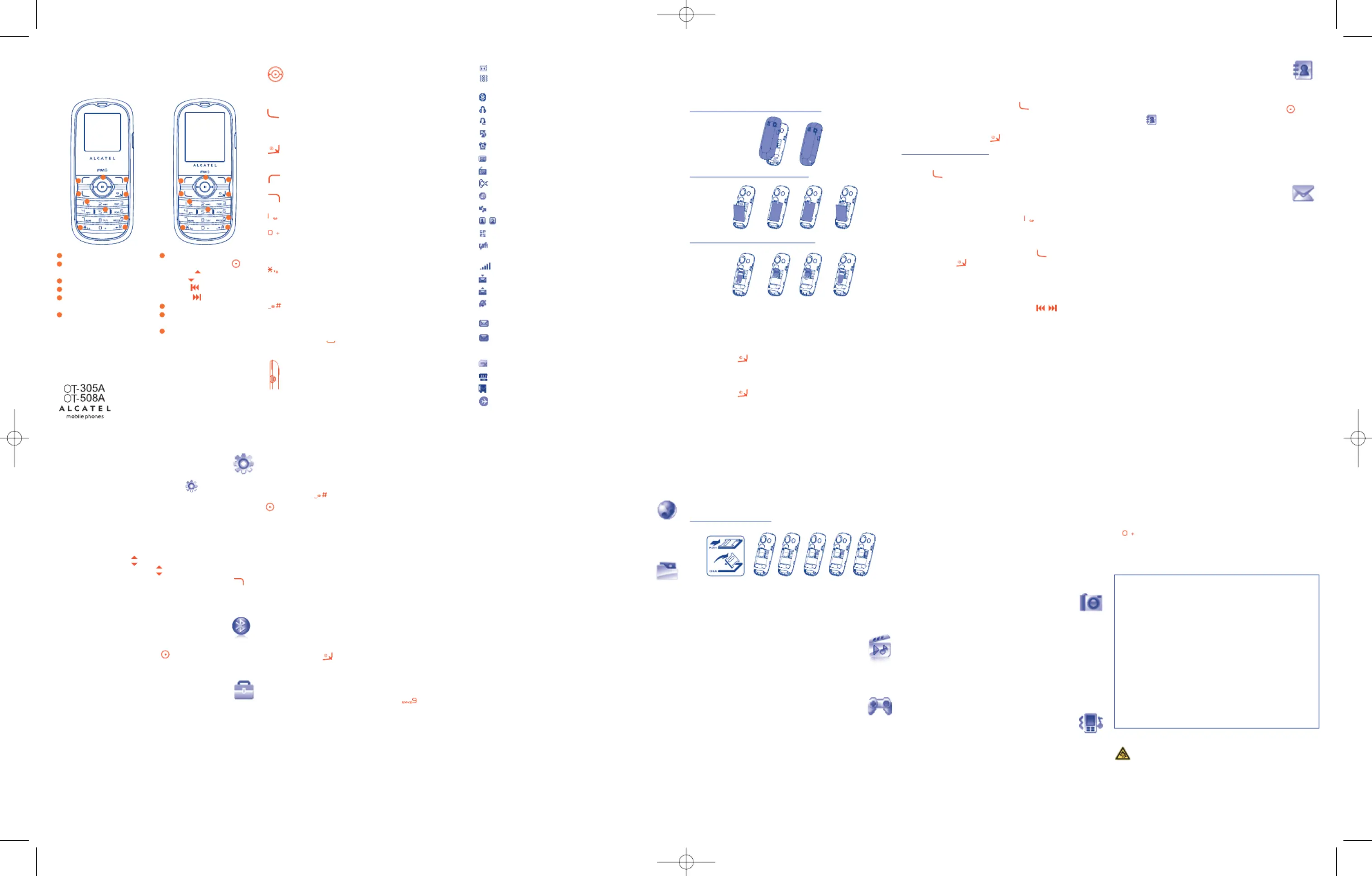
1.1Keys
N
avigationkey
(
1)
Confirmanoption(pressthemiddleofthekey)
Accesswallpapersettings(pressandhold)
Pickup
Sendacall
A
ccesscallmemory(Redial)(shortkeypress)
Switchon/Switchoffthetelephone(pressandhold)
Endcall
R
eturntothemainscreen
Leftsoftkey
Rightsoftkey
A
ccessyourvoicemail(pressandhold)
InEditmode:
-
Press:accessthelanguagelist
-Pressandhold:enterzero
InEditmode:
-
Press:changeinputmethods
-Pressandhold:accesstheSymbolstable
Frommainscreen
-Press:#
-Pressandhold:activate/deactivatethevibrator
InEditmode:
-Press:(space)
-Pressandhold:addaword
Camerakey
(
2)
:access""Camera
Musickey
(3)
:access"Musicplayer"
8.2Alarm
Yourcellphonehasabuilt-inalarmclockwithasnoozefeature.
8.3Calculator
Holddownthekeytogetthedecimalpoint.Confirmwiththe
keyortheleftsoftkey.
8.4Converter
UnitconverterandCurrencyconverter.
8.5Voicememo
Thisfeatureenablesyoutorecordacallbyselecting"Voicememo"
whilecommunicating.Torecordasound,select"Voicememo",then
"".Newrecord
8.6Fakecall
Thisprogramenablesyoutocallyourselfbysimulatingacaller
number/name,ringtone,contactphotoatascheduledtime.Ithelpsyou
topolitelyescapefromsocialsituationsatanytimeyouwish.Thiscall
canberejectedbykey.
Settings•PredefinedsettingsofCallername/number,Calltime,
Ringtone,Image(Contactphoto).
ActivateTools\Fakecall\Activate•Activateafakecallby""
orbyalongpressofthekeyonthemain
screen.Thecallwillthenbemadeatthe
predeterminedtime.
8.7Memorystatus
Itwillindicatehowmuchspaceisusedandhowmuchiscurrentlyfree
onyourphoneormemorycard.
1.2Mainscreenicons
B
atterychargelevel.
Vibrationalert:yourphonevibrates,butneitherringsnor
b
eepsexceptforthealarms.
Bluetoothstatus(Blue-Activated)
(1)
.
Bluetoothstatus(Connectedtoanaudiodevice)
(
1)
.
Headsetconnected.
Callforwardingactivated:yourcallsareforwarded.
Alarmclockprogrammed.
Voicemailmessagearrived.
F
Mradioison.
Missedcalls.
WAPalerts
(
2)
.
Roaming.
Lineswitching
(
2)
:indicatestheselectedline.
GPRSactiveconnectionstatus(Blue-Activated).
Shownonlyinnon-encryptionmodewhilecalling,sending/re-
c
eivingSMS.
Levelofnetworkreception.
Receptionofamessageinprogress.
Sendingamessage.
Silencemode:yourphoneneitherrings,beepsnorvibrates
exceptforthealarms.
Messageunread.
Messagelistisfull:yourphonecannotacceptanynewmes-
sages.Youmustaccessthemessagelistanddeleteatleastone
messageonyourSIMcard.
SIMcardunavailable.
Memorycardscanninginprogress.
Memorycardscanningcompleted.
Flightmode.
8.8Myshortcuts
Accesstheshortcutsalreadyprogrammed.Toprogramnewshortcuts:
select""ifyouwanttocreateaquickaccesstoafunc-Myshortcuts
tion,Directory,orWAPBookmarks,etc.
9
WAP......................
AccessWapoptions:Homepage,Bookmarks,Recentpages,Offline
pages,GotoURLandProfiles.
10
Filemanager
(1)
......
YouwillhaveaccesstoallaudioandvisualfilesstoredinphoneinFile
manager.
10.1Myaudios
Chooseanaudiofileforanincomingcall,amessagealert,poweron/off
ringtoneoranalarmandscheduler.
10.2Myimages
YoucanselectanimageoraphotoaswallpaperortheON/OFF
screen.
10.3Mycreations
Thisfeaturestoresallthephotoscapturedbyyourcellphone.
10.4Unknownfiles
Storefilesofunsupportedformat.
2
Gettingstarted............
2.1Set-up
Removingandinstallingthebackcover
Installingandremovingthebattery
InsertingandremovingtheSIMCard
PlacetheSIMcardwiththechipfacingdownwardsandslideitintoits
housing.Makesurethatitiscorrectlyinserted.Toremovethecard,
pressitandslideitout.
2.2Poweronyourphone
Holddownthekeyuntilthephonepowerson.
2.3Poweroffyourphone
Holddownthekeyfromthemainscreen.
10.5Formatsandcompatibility
-Sounds:midi,amr,MP3,...
-Images:jpg,gif
10.6Memorycard
Youwillhaveaccesstoallfilesstoredonmemorycardhere.
Insertthememorycard
ToreleasethemicroSDcardholder,slideitinthedirectionofthearrowand
liftit.TheninsertthemicroSDcardwiththegoldencontactdownward.
Finally,turndownthemicroSDholderandslideitintheopposite
directiontolockit.
11
Musicplayer
(1)
......
Accessthisfeaturefromthemainmenubyselecting"Musicplayer"or
directlybypressingtheSidekey.
12
FUN........................
12.1Games
YourAlcatelphonemayincludesomegames.
3
Calls..............................
3.1Makingacall
D
ialthedesirednumberthenpressthekeytoplacethecall.Ifyou
makeamistake,youcandeletetheincorrectdigitsbypressingtheright
softkey.
Tohangupthecall,pressthekey.
Makinganemergencycall
I
fyourphoneiscoveredbythenetwork,dialemergencynumberand
pressthekeytomakeanemergencycall.Thisworksevenwithout
aSIMcardandwithouttypingthePINcodeorunlockingthekeypad.
3.2Callingyourvoicemail
(1)
Toaccessyourvoicemail,holddownthekey.
3.3Receivingacall
Whenyoureceiveanincomingcall,pressthekeytotalkandthen
h
angupusingthekey.
3
.4Availablefunctionsduringthecall
Duringacall,youcanuseyourdirectory,yourdiary,shortmessages,
etc.withoutlosingyourcallerbypressingthekey.
12.2FMradio
YourphoneisequippedwithanFMradio
(1)
withRDSfunctionality.You
canusetheapplicationasatraditionalFMradiowithautomatictuning
andsavedchannelsorwithparallelvisualinformationrelatedtothe
radioprogramonthedisplay,ifyoutunetostationsthatofferVisual
Radioservice.Youcanlistentoitwhilerunningotherapplications.
12.3Filemanager
(2)
SeePage9.
12.4Musicplayer
(2)
SeePage10.
13
Camera..................
Yourcellphoneisfittedwithacamerafortakingphotosthatyoucanuse
indifferentways:
-storetheminyour"".Filemanager
-sendtheminamultimediamessage(MMS)toacellphoneoran
emailaddress.
-customizeyourmainscreen.
-selectthemasanincomingcallimagetoacontactinyourdirec-
tory.
14
Profiles....................
Withthismenu,youmaypersonalizeringtonesfordifferenteventsand
environments.
4
Directory................
4
.1Consultingyourdirectory
Toaccessthefromthemainscreen,pressthekeyanddirectory
selecttheiconfromthemenu.
4.2Addingacontact
Selectthedirectoryinwhichyouwishtoaddcontact,pressthe
""softkey,select"".OptionsAddcontact
5
Messages................
5.1Createmessage
F
romthemainmenuselect""tocreatetext/multimediaMessages
message.Youcantypeamessageandyoucanalsomodifyapredefined
messageinTemplatesorcustomizeyourmessagebyaddingpictures,
p
hotos,sounds,titles,etc(onlyavailablewhileeditingaMMS).While
writingamessage,select""toaccessallthemessagingoptions.Options
YoucansaveyourmessagesthatyousendoftentoorDrafts
Templates(MMSonly).
12
(
1)
OT-508Aonly.
(
2)
Dependingonyournetworkoperator.
(
1)
Dependingonyournetworkoperator.
(2)
OT-305Aonly.
(3)
OT-508Aonly.
3
456
6
Settings..................
Fromthemainscreen,selecttheiconmenuandselectthefunc-
tionofyourchoiceinordertocustomizeyourtelephone:Color,Display,
Clock,Keys,Moresettings...
6.1Homescreen
Fromhomescreen,youcanquicklyaccessthefeaturesthatyouuse
themost.
Whenactivated,presskeystoscrollup/downapplication
shortcutsonebyone,andpresskeystoaccessalistofavailable
actionsoftheselectedapplications.Toclosethelist,presskey.
Thisfeatureisactivatedbydefault.Toexitthisfunction,youcansetit
offfrom"".Settings\Homescreen\Off
7
Bluetooth™
(1)
........
Accessthisfeaturebypressingthekeytoenterthemainmenu,
thenselecting"".Bluetooth
8
Tools........................
8.1Calendar
Onceyouenterthismenufrom"Tools",thereisamonthly-view
calendarforyoutokeeptrackofimportantmeetings,appointments,
etc.Dayswitheventsenteredwillbemarkedincolor.
7
8910
ALCATELisatrademarkof
Alcatel-Lucentandusedunderlicenseby
TCTMobileLimited.
Allrightsreserved©Copyright2010
TCTMobileLimited.
TCTMobileLimitedreservestherighttoalter
materialortechnicalspecificationwithoutpriornotice.
11
12
(1)
Contactyournetworkoperatortocheckserviceavailability.
(1)
Thequalityoftheradiodependsonthecoverageoftheradio
stationinthatparticulararea.
(2)
OT-305Aonly.
Leftsoftkey
Pickup/Sendcall
Callmemory
Voicemail
Rightsoftkey
Switchon/Switchoff
Endcall
Vibrationalert
Navigationkey
(
1)(2)
:
Menu/Confirmanoption
Directory
Profiles
Camera
Calendar
Lock/Unlock
Switchon/offLEDtorch(long
keypress)
Activatefakecall(longkeypress)
10
9
8
7
3
6
5
4
2
1
O
T-305AOT-508A
1
(1)
OT-508Aonly.
2
7
4
5
3
9
8
6
10
1
2
7
4
5
3
9
8
6
10
Prolongedexposuretomusicatfullvolumeonthemusicplayermay
damagethelistener'shearing.Setyourphonevolumesafely.Useonly
headphonesrecommendedbyTCTMobileLimitedanditsaffiliates.
15
Latininputmode..........
Towritemessages,therearetwowritingmethods:
-Normal:thismodeallowsyoutotypetextbychoosingaletterora
sequenceofcharactersassociatedwithakey.
-PredictivewiththeeZimode:thismodespeedsupthewritingof
yourtext.
-keyineditmode
Press:accessthelanguagelist
Pressandhold:enterzero
English-CJB30Y1ALAAB
(1)
Dependingonyournetworkoperator.
(2)
Disabledwhen"Homescreen"ison.
(1)
OT-508Aonly.
(1)
OT-508Aonly.
IP2814_305A_508A_QG_Eng_USA_17_101125:Layout 1 2010-11-25 15:42 Page 1
Specyfikacje produktu
| Marka: | Alcatel |
| Kategoria: | smartfon |
| Model: | One Touch 508A |
Potrzebujesz pomocy?
Jeśli potrzebujesz pomocy z Alcatel One Touch 508A, zadaj pytanie poniżej, a inni użytkownicy Ci odpowiedzą
Instrukcje smartfon Alcatel

12 Stycznia 2025
13 Grudnia 2024
29 Września 2024
27 Września 2024
27 Września 2024
23 Września 2024
22 Września 2024
21 Września 2024
17 Września 2024
16 Września 2024
Instrukcje smartfon
Najnowsze instrukcje dla smartfon
2 Kwietnia 2025
30 Marca 2025
10 Marca 2025
7 Marca 2025
5 Marca 2025
5 Marca 2025
3 Marca 2025
2 Marca 2025
26 Lutego 2025
26 Lutego 2025