Instrukcja obsługi Concept2 PM3
Przeczytaj poniżej 📖 instrukcję obsługi w języku polskim dla Concept2 PM3 (4 stron) w kategorii Niesklasyfikowane. Ta instrukcja była pomocna dla 26 osób i została oceniona przez 8 użytkowników na średnio 4.9 gwiazdek
Strona 1/4
1
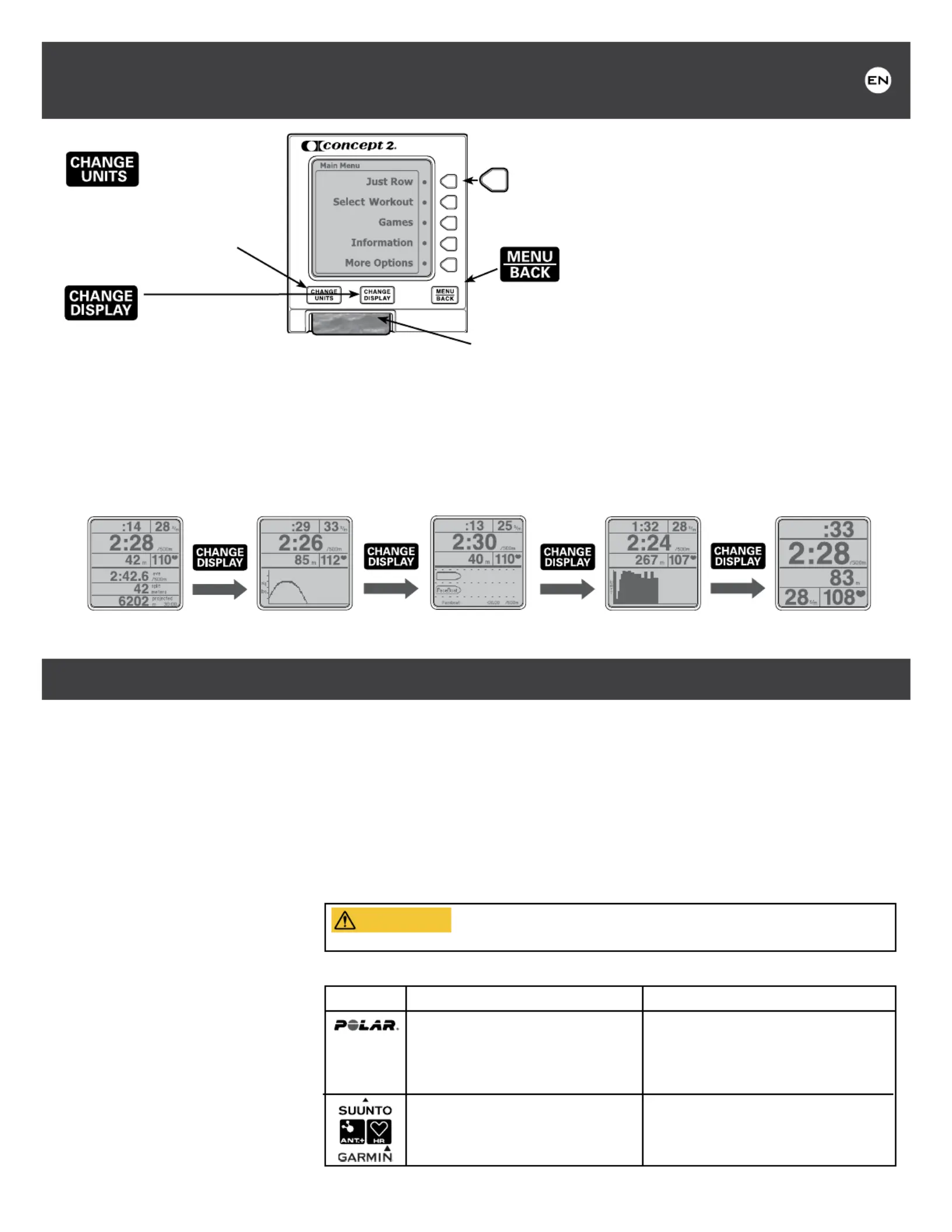
allows you to select
meters, pace, watts or calories.
Push this button any time while
setting up a workout, during a
workout or viewing results.
allows you to
choose another display. Push
this button any time during a
workout. Each time you press
[CHANGE DISPLAY] a new
display is shown. See illustrations.
Five Graphic Displays
Turning the PM On/Off:
The PM will turn on when you:
•takeastroke
•press[MENU/BACK]
•insertaLogCardorUSBcable
•insertbatteriesorbatterypack
The PM turns off after four
minutes of inactivity on a workout
screen, or after one minute on the
Main Menu screen.
Setting Date and Time:
The first time you turn on the
PM, you are prompted to set the
date and time. This ensures your
results are associated with the
proper date.
•Ifyoueverneedtore-setDate/
Time, from press Main Menu
More Options > Utilities > Set
Date and Time.Usebuttons
as indicated to increase or
decrease time.
General Operation:
•ThePMautomaticallydisplaysyourworkoutdataassoonasyoustartyourworkout.
Itisnotnecessarytopressanybuttonsifyoudonotwantto.
•Press[MENU/BACK] to go back to the previous display.
•Press[]or[CHANGE UNITSCHANGE DISPLAY] at any time during and after your
workout to view different units and a different presentation of your workout data.
•Weencourageyoutoexplorethemenuandexperimentwiththebuttons!
Using a Heart Rate Monitor:
WARNING!Heartratemonitoringsystemsmaybeinnaccurate.Over-exercising
mayresultinseriousinjuryordeath.Ifyoufeelfaint,stopexercisingimmediately.
The PM displays your heart rate if one of the following heart rate systems is in use:
PM3
The PM3 will receive heart rate
transmission from a Polar™ chest belt
IFtheoptionalConcept2HeartRate
Receiver(availablefromConcept2)isin
use and plugged into the PM3.
Not available.
PM4
The PM4 will receive heart rate
transmissionfromaPolar™chestbeltIF
theoptionalConcept2HeartRateReceiver
(availablefromConcept2)isinuseand
plugged into the PM4.
The PM4 will receive heart rate
transmission directly from a Suunto™,
Garmin
®
orANT+HR
™
chest belt.
See for set up.More Options
Note:HeartRate(HR)willbedisplayedonlyifHRInterfaceisinuse.
GETTING STARTED
ALL DATA FORCE CURVE PACEBOAT/PACE SKIER BAR CHART LARGE PRINT
OVERVIEW OF THE PERFORMANCE MONITOR(PM)
For Model D, Model E and Dynamic Indoor Rowers, and the SkiErg.
For more detailed information about using the Performance Monitor, please visit concept2.com/pm.
LogCard:whenaLogCardispresent,workoutdatawillbestored
ontheLogCard.Afteryourworkout,returntotheMain Menu before
removingtheLogCardtoensureproperstorageofdata.(IfnoLogCard
present, data is stored in Memory.)Usethe“Concept2LogCardUtility”to
backupyourLogCarddatatoyourPC.(USBcableprovided)
Note: ALogCardisprovidedwitheveryPerformanceMonitor(PM).Each
card can be shared by up to five users. Additional cards can be purchased
fromConcept2.
These buttons allow you to:
•makemenuselections
•incrementnumbersforsettingworkoutsanddate/time
•viewalternatedisplaysduringuse
turns on the monitor and displays or Main Menu
the previous menu. After a workout, press this button to end
the workout and return to the .Main Menu
Specyfikacje produktu
| Marka: | Concept2 |
| Kategoria: | Niesklasyfikowane |
| Model: | PM3 |
Potrzebujesz pomocy?
Jeśli potrzebujesz pomocy z Concept2 PM3, zadaj pytanie poniżej, a inni użytkownicy Ci odpowiedzą
Instrukcje Niesklasyfikowane Concept2

7 Października 2024
7 Października 2024
7 Października 2024
Instrukcje Niesklasyfikowane
Najnowsze instrukcje dla Niesklasyfikowane
29 Stycznia 2025
29 Stycznia 2025
29 Stycznia 2025
29 Stycznia 2025
29 Stycznia 2025
29 Stycznia 2025
29 Stycznia 2025
29 Stycznia 2025
29 Stycznia 2025
29 Stycznia 2025