Instrukcja obsługi Equip Cat.6a Keystone Jack shielded LSA+
Equip Kable do komputerów PC i urządzeń peryferyjnych Cat.6a Keystone Jack shielded LSA+
Przeczytaj poniżej 📖 instrukcję obsługi w języku polskim dla Equip Cat.6a Keystone Jack shielded LSA+ (1 stron) w kategorii Kable do komputerów PC i urządzeń peryferyjnych. Ta instrukcja była pomocna dla 35 osób i została oceniona przez 9 użytkowników na średnio 4.8 gwiazdek
Strona 1/1
2.Follow the color-coding to position T568A or T568B wiring.
T568AT568B
Pin 1Pin 1White/GreenWhite/Orange
Pin 2Pin 2GreenOrange
Pin 3Pin 3White/OrangeWhite/Green
Pin 4Pin 4BlueBlue
Pin 5Pin 5White/BlueWhite/Blue
Pin 6Pin 6OrangeGreen
Pin 7Pin 7White/BrownWhite/Brown
Pin 8Pin 8BrownBrown
Cap
Cable tie
www.equip-info.net
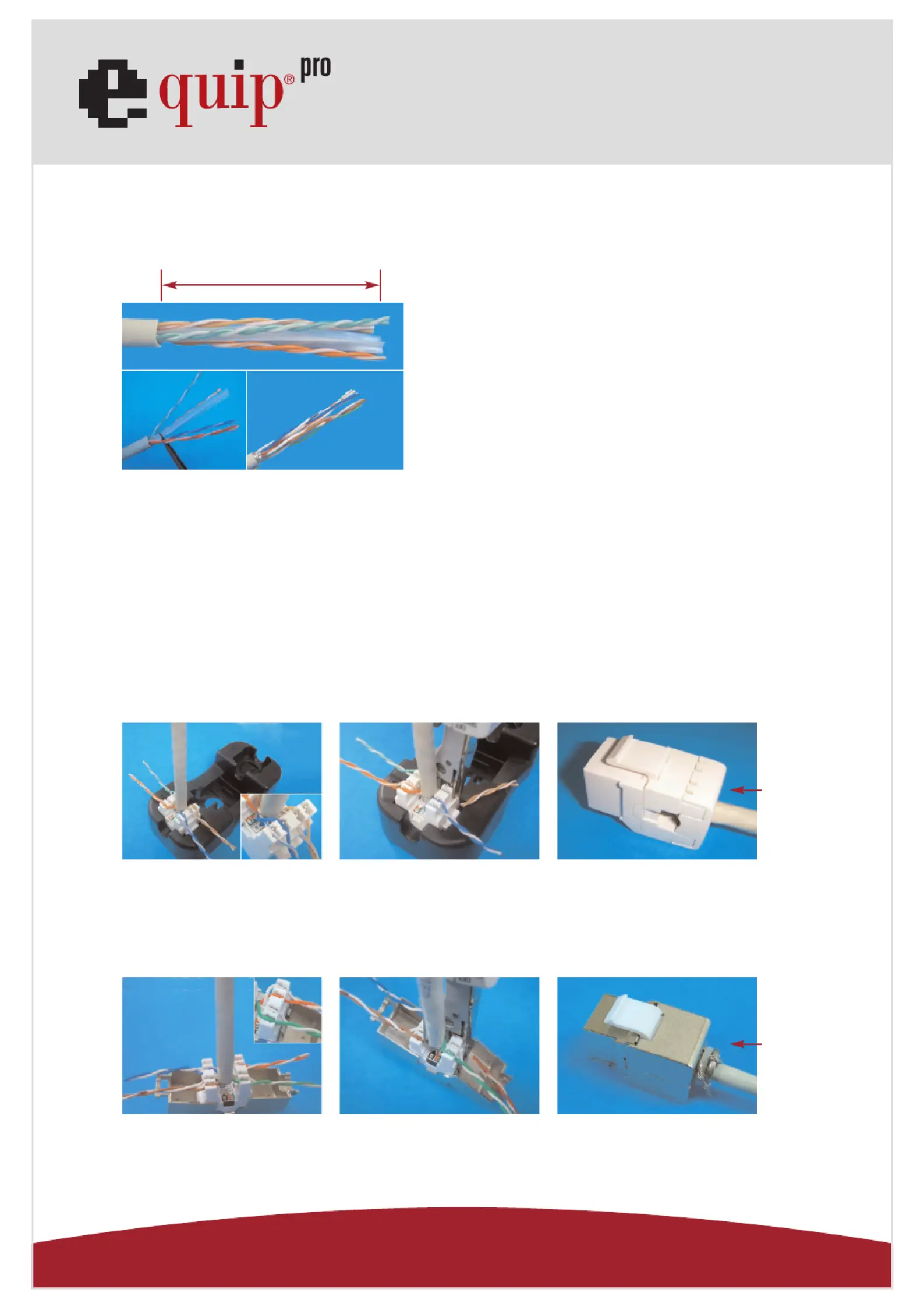
1.Strip approximately 40mm of the cable jacket.
3.Follow the wiring sticker to place the wires into IDC slot.
Make sure to keep the pairs twisted as long as possible.
4.Punch the wires with a 110 or Krone impact tool and cut
off the surplus wires.
Unshielded Type:
5.Snap in the IDC cap to fix the wires, and finish the installation.
Shielded Type:
5.Tie up the cable by cable tie, and finish the installation.
40mm
Cat.6 Keystone Jack LSA+
Specyfikacje produktu
| Marka: | Equip |
| Kategoria: | Kable do komputerów PC i urządzeń peryferyjnych |
| Model: | Cat.6a Keystone Jack shielded LSA+ |
Potrzebujesz pomocy?
Jeśli potrzebujesz pomocy z Equip Cat.6a Keystone Jack shielded LSA+, zadaj pytanie poniżej, a inni użytkownicy Ci odpowiedzą
Instrukcje Kable do komputerów PC i urządzeń peryferyjnych Equip

26 Września 2024
26 Września 2024
26 Września 2024
26 Września 2024
26 Września 2024
26 Września 2024
26 Września 2024
26 Września 2024
26 Września 2024
26 Września 2024
Instrukcje Kable do komputerów PC i urządzeń peryferyjnych
Najnowsze instrukcje dla Kable do komputerów PC i urządzeń peryferyjnych
29 Stycznia 2025
12 Stycznia 2025
10 Stycznia 2025
4 Stycznia 2025
2 Stycznia 2025
2 Stycznia 2025
2 Stycznia 2025
2 Stycznia 2025
1 Stycznia 2025
30 Grudnia 2025