Instrukcja obsługi Extron Annotator 300
Extron Niesklasyfikowane Annotator 300
Przeczytaj poniżej 📖 instrukcję obsługi w języku polskim dla Extron Annotator 300 (4 stron) w kategorii Niesklasyfikowane. Ta instrukcja była pomocna dla 29 osób i została oceniona przez 7 użytkowników na średnio 4.6 gwiazdek
Strona 1/4
1
Installation
Mounting and Cabling
Step 1 — Mounting
a. Turn off or disconnect all equipment power sources.
b. Mount the Annotator 300 to a rack using the pre-installed rack ears (see
gure 1), or use an optional MBU 149 mounting kit (part number 70-222-01)
for under-the-desk mounting (see gure 2).
Step 2 Connecting inputs—
a. Connect analog video sources to the universal connector (see
B
above).
Compatible sources are RGB, YUV (HD or SD), RGBcvS, S-video and
composite video. Default setting for the input is auto-detect.
b. Connect a digital HDMI or DVI source to the HDMI connector (see
C
above).
c. Connect a DisplayPort input source to the DisplayPort connector (see
D
above).
Step 3 Connecting outputs—
a. Connect suitable video displays to the two HDMI connectors (see
E
above).
b. Connect either an Extron DTP device to this connector for transmission over
DTP (default), or connect an HDBaseT device if transmitting over HDBaseT
(see
F
above). Set the DIP switch to DTP or HDBaseT as applicable.
CAUTION:Risk of damage to equipment.
DO NOT connect an HDBaseT unit if using DTP transmission.
The power carried over DTP may damage the unit.
Attention:Cela risque d'endommager votre équipement.
Ne PAS connecter une unité HDBaseT si vous utilisez la transmission
DTP. L'alimentation transmise sur DTP peut endommager l'unité.
Annotator 300 • Setup Guide
The Extron Annotator 300 Annotation Graphics Processor is a scaling product that allows a presenter to draw, point, or type on video or
computer source outputs using a touch panel, mouse, or keyboard.
This set up guide allows you to easily and quickly set up and congure your Annotator 300 using step by step instructions. It covers
performing basic operations using the front panel controls and selected Simple Instruction Set (SIS
™
) commands.
NOTE:For full installation, configuration, menus, and operation details, see the at Annotator 300 User Guidewww.extron.com.
Rack Ears
50/60 Hz
100-240VAC --A MAX
OVER DTP
DTP
HDBT
REMOTEOUTPUTS
INPUTS
RS-232IR
11UNIVERSALHDMIDISPLAYPORT23HDMI2AHDMI2B
TxRxGTxRx
CONTACT
LAN
RESET
USB
1
1
2
23
RS-232
TxRxG
SIG
DTP OUT
LINK
A
D
EF
G
HIJK
L
BC
Power and video input connectionsOutputs and control connections
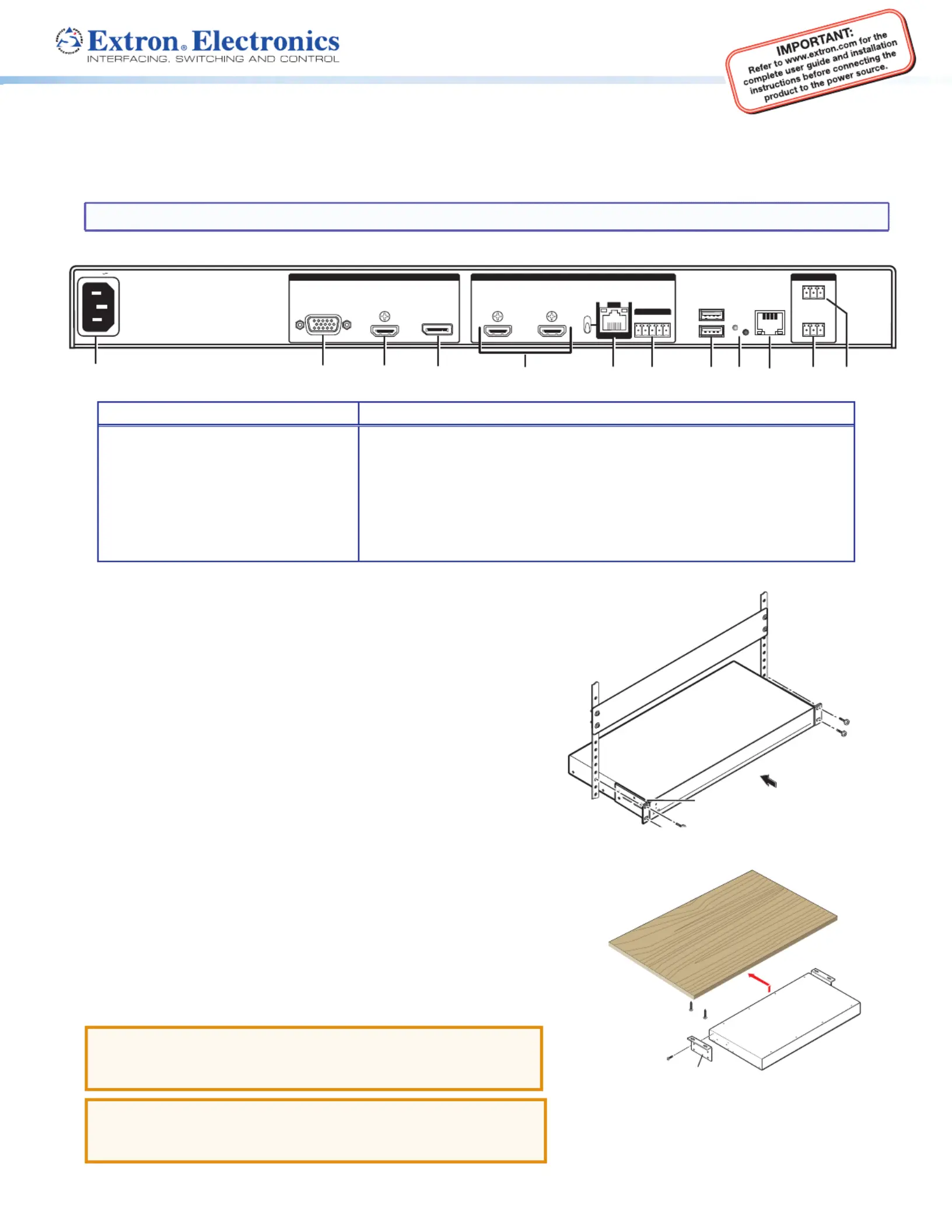
AAC power connector
B Universal analog 15-pin HD connector
C HDMI connector (HDMI/DVI inputs)
D DisplayPort connector
E HDMI connectors (2) (HDMI/DVI outputs)
F
RJ-45 connector (DTP or HDBaseT
output), selectable by DIP switch
G
5-pole captive screw connector
(for DTP RS-232 and IR insert)
H
USB A connectors (2)
I
Reset button and LED
J
RJ-45 LAN connector
K
Remote RS-232 3-pole captive
screw connector
L
Remote contact closure 3-pole
captive screw connector
Rear Panel Features
#8 Screw
(4) Places
Each Side
MBU 149
Mounting Bracket
Mounting Screws
(2) Places
Each Side
Figure 1. Rack Mount
Figure 2. Furniture Mount
Specyfikacje produktu
| Marka: | Extron |
| Kategoria: | Niesklasyfikowane |
| Model: | Annotator 300 |
Potrzebujesz pomocy?
Jeśli potrzebujesz pomocy z Extron Annotator 300, zadaj pytanie poniżej, a inni użytkownicy Ci odpowiedzą
Instrukcje Niesklasyfikowane Extron

10 Stycznia 2025
10 Stycznia 2025
6 Stycznia 2025
6 Stycznia 2025
6 Stycznia 2025
3 Stycznia 2025
3 Stycznia 2025
3 Stycznia 2025
3 Stycznia 2025
3 Stycznia 2025
Instrukcje Niesklasyfikowane
Najnowsze instrukcje dla Niesklasyfikowane
29 Stycznia 2025
29 Stycznia 2025
29 Stycznia 2025
29 Stycznia 2025
29 Stycznia 2025
29 Stycznia 2025
29 Stycznia 2025
29 Stycznia 2025
29 Stycznia 2025
29 Stycznia 2025