Instrukcja obsługi Extron DTP T FB 232
Extron Niesklasyfikowane DTP T FB 232
Przeczytaj poniżej 📖 instrukcję obsługi w języku polskim dla Extron DTP T FB 232 (4 stron) w kategorii Niesklasyfikowane. Ta instrukcja była pomocna dla 22 osób i została oceniona przez 6 użytkowników na średnio 4.5 gwiazdek
Strona 1/4
1
DTP T FB 332 and DTP T FB 232 • Setup Guide
This guide provides instructions for an experienced installer to install either
the Extron DTP T FB 332 or the DTP T FB 232 switching transmitter into an
Ackermann GB3 (OBO Betterman), MK Electric CableLink Plus Modular,
MK Electric CableLink Plus
Single Pan, ElectraPlan, or PUK
oor box and to make all
connections.
The transmitters switch
between one analog video and
one digital (HDMI) video input
and, paired with a compatible
receiver, can extend the
selected signal up to
330 feet (100 m) (DTP T FB 332) or
230 feet (70 m) (DTP T FB 232).
Installation
Planning
CAUTION:Failure to check these items may result in personal injury or property damage.
ATTENTION :La non-vérication des éléments listés ci-dessous peut provoquer des blessures ou dommages matériels.
Check that the installation meets the building, electrical, and safety codes.
Mounting and Cabling
Typicabol Floorx
1
2
3
Step 1 Preparing the floor box—
a. Install the oor box as directed by the manufacturer.
NOTE:Run all required cables and secure them with cable clamps.
b. Turn off or disconnect all equipment power sources.
Step 2 Installing adapters—
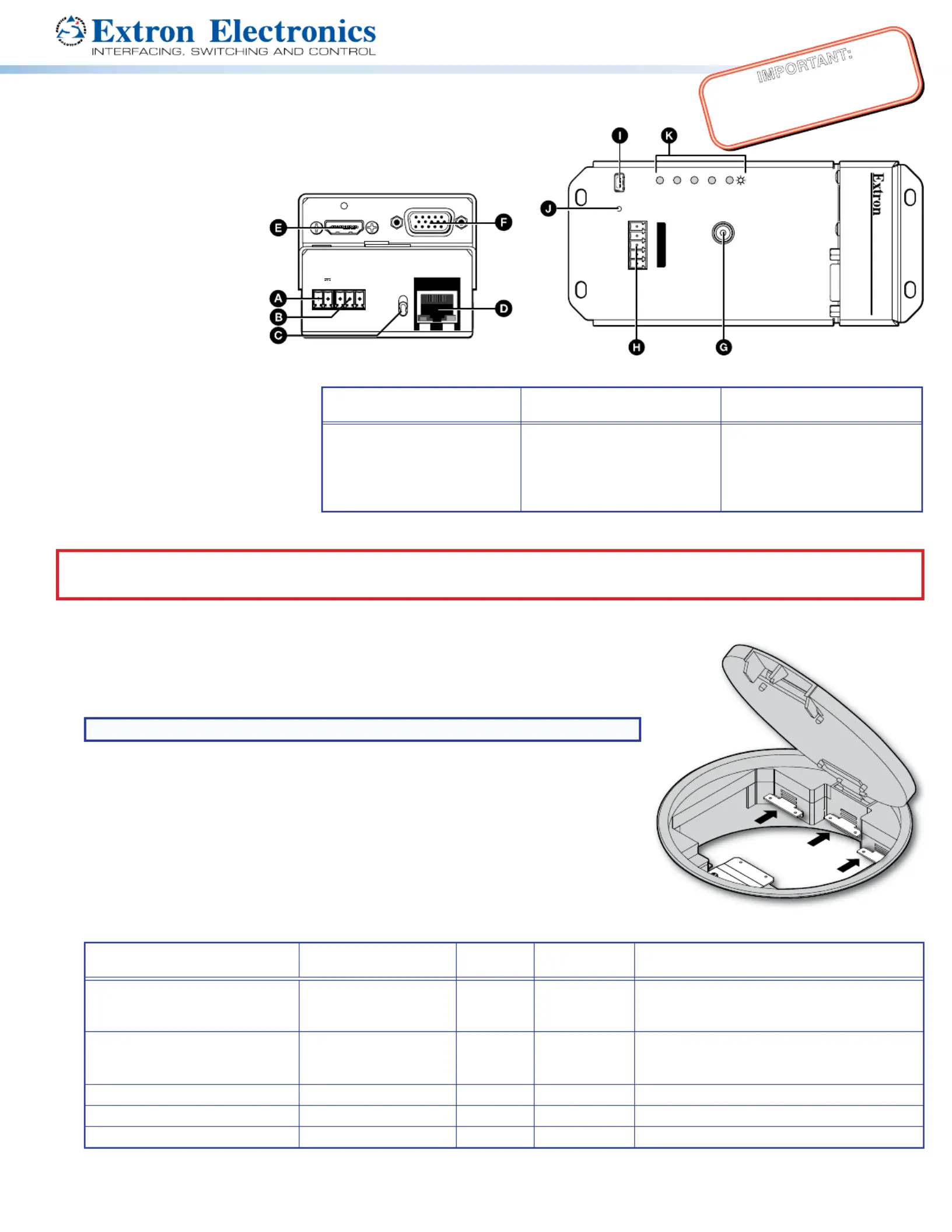
a. Determine a position in the oor box to mount the DTP T FB unit (see the image at right).
b. Identify the applicable adapter plates for the oor box (see the table below).
c. Install adapter plates to the same pair of mounting slots (see the table below for slot
recommendations) for the same position in the oor box. Slide the top ange into the
mounting slot and rotate the adapter plate down so the bottom ange rests against the
wall of the oor box.
Floor BoxAdapter PlatesPositions
Highest
Mounting Slot
Additional Notes
Ackermann GB3
(OBO Betterman)
995241 (2)
995241 (2) and 995242 (1)
1 and 3
2
3rd from top
For position 2, use the provided screws to attach
the 995242 adapter plate to either 995241
adapter plate.
MK Electric CableLink Plus
Single Pan
995243 (2)1 and 3
N
/A
Do not use position 2. Use mounting screws to
secure the adapter plates to the oor box (see
figure 3 on page 3).
MK Electric CableLink Plus Modular995244 (2)1, 2, and 33rd from top
ElectraPlan995300 (2)1, 2, and 33rd from top
PUK995300 (2)1, 2, and 33rd from top
IMPORTANT:
Go to www.extron.com for the complete
user guide, installation instructions, and
specications bef
ore connecting the
pr
oduct to the po
wer source.
CONFIGG
RS-232 IR
RxTxTxRx
HDMI INVGA IN
DTP T FB 332
AUDIO IN
OVER DTP
RESET
HDMI
VGA
HDCP
AUTO
Top Panel
Figure 1. DTP T FB Unit features
Side (under adapter plate)
(Before installation in floor box)
Side (above adapter plate)
(After installation in floor box)
Top
A
DC power input
B
Remote RS-232
C
TP function switch
D
DTP output
E
HDMI input
F
VGA Input
G
Audio input
H
RS-232/IR Over TP output
I
Conguration (USB)
J
Reset button
K
LEDs
SIG LINK
OUT
G
REMOTE
RS-232
Rx
Tx
POWER
12V
1.0A MAX
−+
DTP
HDBT
Side Panel
Specyfikacje produktu
| Marka: | Extron |
| Kategoria: | Niesklasyfikowane |
| Model: | DTP T FB 232 |
Potrzebujesz pomocy?
Jeśli potrzebujesz pomocy z Extron DTP T FB 232, zadaj pytanie poniżej, a inni użytkownicy Ci odpowiedzą
Instrukcje Niesklasyfikowane Extron

10 Stycznia 2025
10 Stycznia 2025
6 Stycznia 2025
6 Stycznia 2025
6 Stycznia 2025
3 Stycznia 2025
3 Stycznia 2025
3 Stycznia 2025
3 Stycznia 2025
3 Stycznia 2025
Instrukcje Niesklasyfikowane
Najnowsze instrukcje dla Niesklasyfikowane
29 Stycznia 2025
29 Stycznia 2025
29 Stycznia 2025
29 Stycznia 2025
29 Stycznia 2025
29 Stycznia 2025
29 Stycznia 2025
29 Stycznia 2025
29 Stycznia 2025
29 Stycznia 2025