Instrukcja obsługi Extron MBU 149
Extron Niesklasyfikowane MBU 149
Przeczytaj poniżej 📖 instrukcję obsługi w języku polskim dla Extron MBU 149 (3 stron) w kategorii Niesklasyfikowane. Ta instrukcja była pomocna dla 24 osób i została oceniona przez 8 użytkowników na średnio 4.6 gwiazdek
Strona 1/3
Setup Guide — MBU 149
(Continued on reverse side)
The Extron
®
MBU 149 Under-Desk Mount Kit (part number
70-222-01) lets you attach an Extron 1U high device to the
underside of a desk or table, or to a wall. The brackets
extend approximately ¼" (6 mm) above the top surface of the
device, which allows an air space between the enclosure and
the mounting surface.
Installation
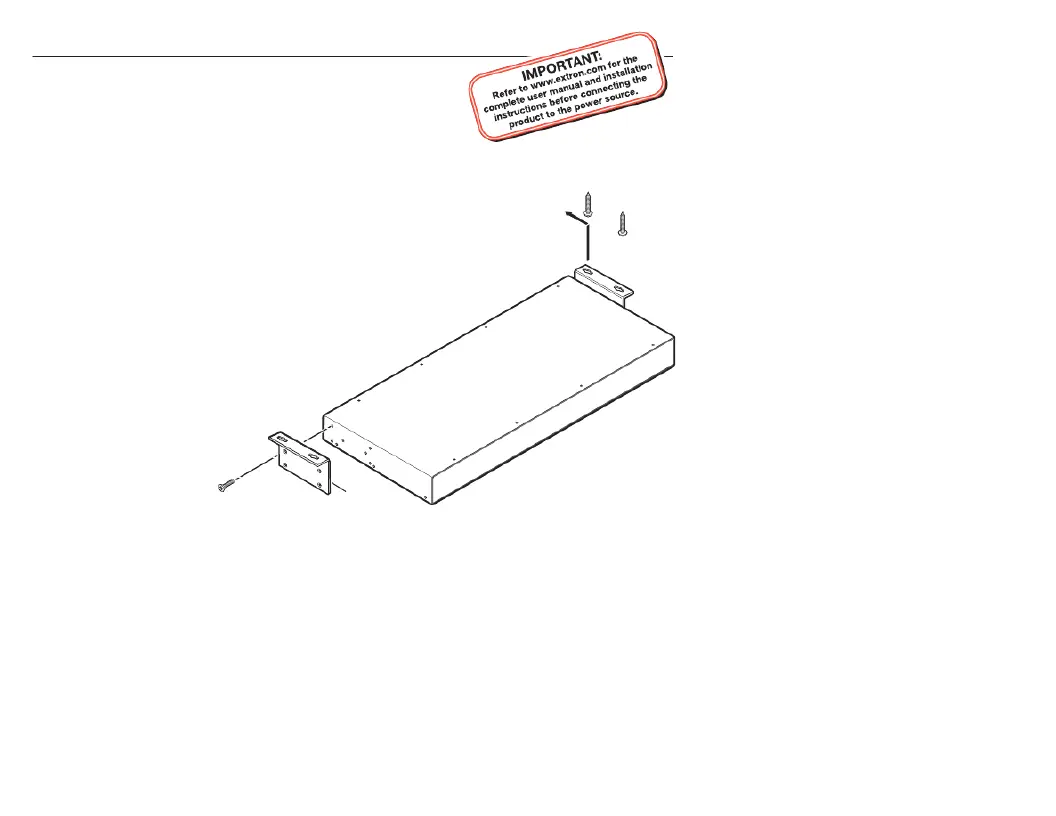
Step 1 — Attach brackets to device
Attach brackets to the device with the supplied machine
screws, as shown on the left side of the picture below.
Step 2 — Mark screw location
Hold the device with attached brackets against the
wall or the underside of the furniture, and
mark the screw hole locations (centers of
the brackets’ screw slots).
Step 3 — Drill holes
Drill four pilot
holes, each
3/32" (2 mm)
in diameter, ¼"
(6 mm) deep,
at the locations
marked in step .2
#8 Screw
(4 Places)
Each Side
Mounting Screws
(2 Places)
Each Side
Mounting
Bratcke
Specyfikacje produktu
| Marka: | Extron |
| Kategoria: | Niesklasyfikowane |
| Model: | MBU 149 |
Potrzebujesz pomocy?
Jeśli potrzebujesz pomocy z Extron MBU 149, zadaj pytanie poniżej, a inni użytkownicy Ci odpowiedzą
Instrukcje Niesklasyfikowane Extron

10 Stycznia 2025
10 Stycznia 2025
6 Stycznia 2025
6 Stycznia 2025
6 Stycznia 2025
3 Stycznia 2025
3 Stycznia 2025
3 Stycznia 2025
3 Stycznia 2025
3 Stycznia 2025
Instrukcje Niesklasyfikowane
Najnowsze instrukcje dla Niesklasyfikowane
29 Stycznia 2025
29 Stycznia 2025
29 Stycznia 2025
29 Stycznia 2025
29 Stycznia 2025
29 Stycznia 2025
29 Stycznia 2025
29 Stycznia 2025
29 Stycznia 2025
29 Stycznia 2025