Instrukcja obsługi Mooer Graphic G
Mooer Niesklasyfikowane Graphic G
Przeczytaj poniżej 📖 instrukcję obsługi w języku polskim dla Mooer Graphic G (1 stron) w kategorii Niesklasyfikowane. Ta instrukcja była pomocna dla 25 osób i została oceniona przez 8 użytkowników na średnio 4.8 gwiazdek
Strona 1/1
Main Features
Smallest guitar graphic equalizer pedal in the world
5-Band Graphic EQ with master level control
±18dB adjustable gain range per band
Full metal shell
Very small and compact design
True bypass switch
DC 9V adapter power supply
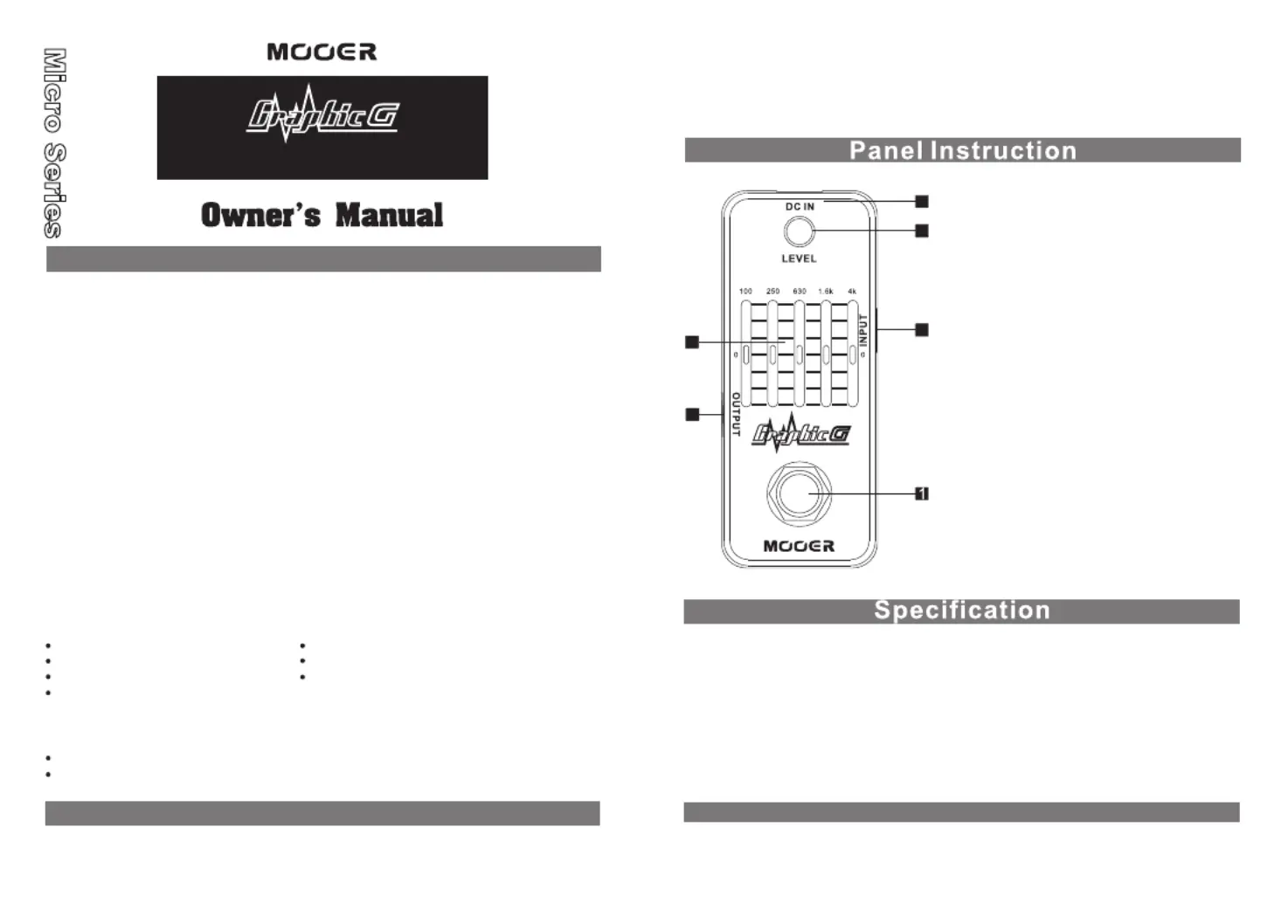
1. TRUE BYPASS Footswitch:
2. DC IN Power Jack:
For power supply, use a 9-volt
DC regulated AC adapter (plug
polarity is positive on the barrel
and negative in the center).
3. INPUT Jack:
1/4mono audio jack, for”
connecting guitar.
4. OUTPUT Jack:
1/4mono audio jack, outputs”
the signal.
5. LEVEL Knob and ON/OFF LED:
Adjusts the level of output, and
instructs effects or bypass status
of Graphic G, when the LED is lit
up, the effects is on.
6. 5-band Slider:
Adjusts the level of each frequency
band (-18dB~+18dB).
Push down the footswitch to toggle
between on and bypass status.
5-Band Guitar Equalizer Pedal
18
18
3
4
6
2
5
Frequency Centers: 100Hz, 250Hz, 630Hz, 1.6kHz, 4kHz
Input: 1/4 monaural jack (impedance: 470k Ohms) ”
Output: 1/4 monaural jack (impedance: 1k Ohms)”
Current Draw: 7 mA
Dimensions: 93.5mm (D) 42mm (W) × ×52mm (H)
Weight:160g
Accessories: Owner’s Manual
* Disclaimer: Any specification’s update won't be amended in this manual.
Power Requirements: AC adapter 9V DC (center minus plug),
recommended to use Mooer Micro Power
PLEASE READ CAREFULLY BEFORE PROCEEDING
Power Supply
Connections
Always turn off the power of this and all other equipment before connecting or
disconnecting, this will help prevent malfunction and / or damage to other devices.
Also make sure to disconnect all connection cables and the power cord before
moving this unit.
Cleaning
Clean only with a soft, dry cloth. If necessary, slightly moisten the cloth.
Do not use abrasive cleanser, cleaning alcohol, paint thinners, wax, solvents,
cleaning fluids, or chemical-impregnated wiping cloths.
Interference with other electrical devices
Radios and televisions placed nearby may experience reception interference.
Operate this unit at a suitable distance from radios and televisions.
Location
To avoid deformation, discoloration, or other serious damage, do not expose
this unit to the following conditions:
Direct sunlight
Heat sources
Magnetic fields
Extreme temperature or humidity
Excessive dusty or dirty location
High humidity or moisture
Strong vibrations or shocks
Please connect the designated AC adapter to an AC outlet of the correct voltage.
Please be sure to use only an AC adapter which supplies 9V (±10%) DC, center
minus. The maximum working voltage shall not exceed 12V, otherwise may be
dangerous equipment damage, fire or other problems.
Unplug the AC power adapter when not using or during electrical storms.
Precautions
FCC certification
This device complies with Part 15 of the FCC Rules. Operation is subject
to the following two conditions:
This device may not cause harmful interference.
This device must accept any interference received, including interference
that may cause undesired operation.
Specyfikacje produktu
| Marka: | Mooer |
| Kategoria: | Niesklasyfikowane |
| Model: | Graphic G |
Potrzebujesz pomocy?
Jeśli potrzebujesz pomocy z Mooer Graphic G, zadaj pytanie poniżej, a inni użytkownicy Ci odpowiedzą
Instrukcje Niesklasyfikowane Mooer

8 Stycznia 2025
15 Grudnia 2024
4 Października 2024
22 Września 2024
22 Września 2024
22 Września 2024
22 Września 2024
22 Września 2024
22 Września 2024
22 Września 2024
Instrukcje Niesklasyfikowane
Najnowsze instrukcje dla Niesklasyfikowane
29 Stycznia 2025
29 Stycznia 2025
29 Stycznia 2025
29 Stycznia 2025
29 Stycznia 2025
29 Stycznia 2025
29 Stycznia 2025
29 Stycznia 2025
29 Stycznia 2025
29 Stycznia 2025