Instrukcja obsługi Satechi R1
Przeczytaj poniżej 📖 instrukcję obsługi w języku polskim dla Satechi R1 (1 stron) w kategorii pilot. Ta instrukcja była pomocna dla 24 osób i została oceniona przez 3 użytkowników na średnio 5.0 gwiazdek
Strona 1/1
COMPATIBLE WITH MAC & IOS DEVICES (2012 & NEWER)
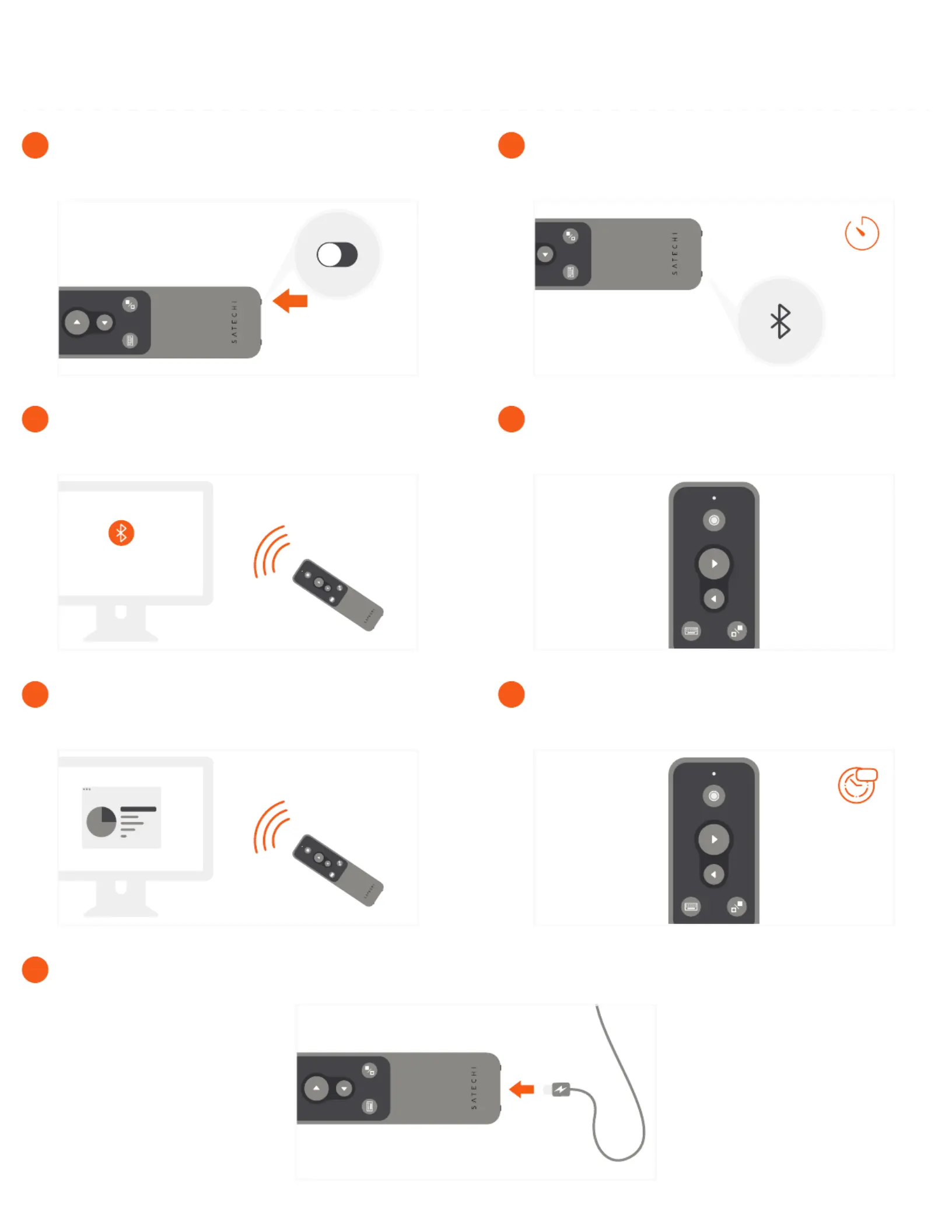
To recharge the remote, connect to a powered USB-C port using the included cable. Flashing red light indicates low battery.
Red light will turn green when fully charged.
7
10m
Zzz
After ten minutes of inactivity, the remote will go into
sleep mode. Press any button to wake.
6
Presentation features supported in PowerPoint,
Keynote, Prezi, Google Slides, PDF. For PowerPoint,
an active Office365 subscription is required.
5
Use the remote’s back/forward slide, black out
screen, virtual keyboard, and laser pointer to control
presentations from afar.
4
In your host device’s Bluetooth settings, select “R1
Presenter” when it appears and connect to finish
pairing process.
3
3s
To place into pairing mode, press and hold the remote’s
Bluetooth button for ~3 seconds.
The light will start flashing
2
Power on the remote using the bottom switch.
1
R1 BLUETOOTH PRESENTATION REMOTE
INSTRUCTIONAL GUIDE
Specyfikacje produktu
| Marka: | Satechi |
| Kategoria: | pilot |
| Model: | R1 |
| Kolor produktu: | Black, Grey |
| Wbudowany wyłącznik: | Tak |
| Wbudowany wyświetlacz: | Nie |
| Wysokość produktu: | 8.9 mm |
| Szerokość produktu: | 127 mm |
| Głębokość produktu: | 37.6 mm |
| Waga produktu: | 62.4 g |
| Ilość na paczkę: | 1 szt. |
| Obsługiwany typ USB: | USB Type-C |
| Obsługiwane systemy operacyjne Mac: | Tak |
| Liczba przycisków: | 5 |
| Pozostałe obsługiwane systemy operacyjne: | iOS |
| Ładowanie akumulatora: | Tak |
| Standardowe rozwiązania komunikacyjne: | Bluetooth |
| Kompatybilność marki: | Apple |
| Obsługa funkcji Plug & Play: | Tak |
| Przyciski oświetlane od tyłu: | Nie |
| Maksymalny zasięg: | 10 m |
| Sposób wprowadzania danych: | Naciśnij przyciski |
| Podświetlane przyciski: | Uniwersalne |
Potrzebujesz pomocy?
Jeśli potrzebujesz pomocy z Satechi R1, zadaj pytanie poniżej, a inni użytkownicy Ci odpowiedzą
Instrukcje pilot Satechi

15 Września 2024
15 Września 2024
15 Września 2024
15 Września 2024
15 Września 2024
Instrukcje pilot
Najnowsze instrukcje dla pilot
11 Października 2024
27 Września 2024
27 Września 2024
25 Września 2024
25 Września 2024
25 Września 2024
25 Września 2024
21 Września 2024
16 Września 2024
15 Września 2024