Instrukcja obsługi StarTech.com CABSHF2POST2
StarTech.com Niesklasyfikowane CABSHF2POST2
Przeczytaj poniżej 📖 instrukcję obsługi w języku polskim dla StarTech.com CABSHF2POST2 (2 stron) w kategorii Niesklasyfikowane. Ta instrukcja była pomocna dla 19 osób i została oceniona przez 6 użytkowników na średnio 4.7 gwiazdek
Strona 1/2
Quick-Start Guide
To view manuals, FAQs, videos, drivers, downloads, technical drawings, and more, visit www.startech.com/support.
Manual Revision: November 27, 2019 1:38 PM
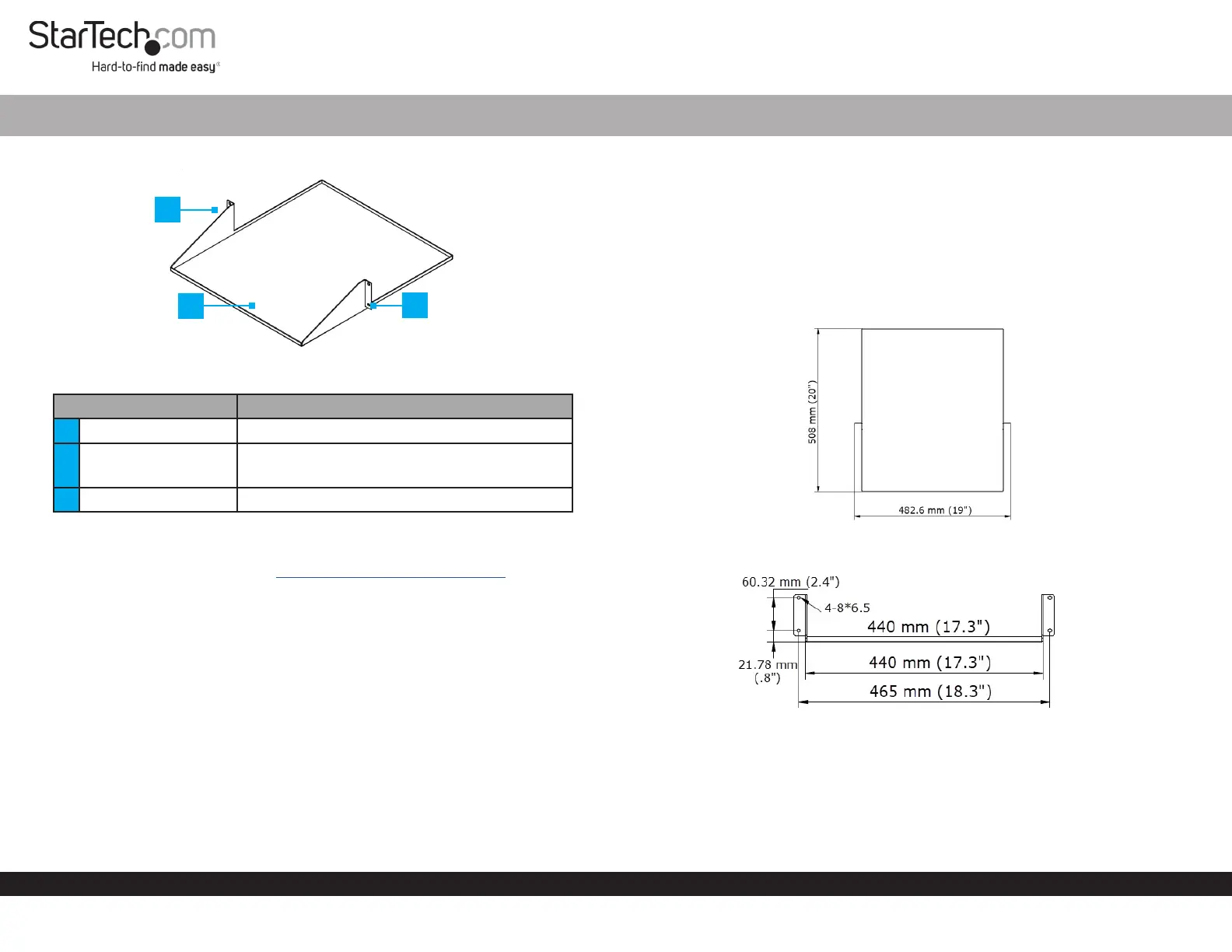
Product Diagram (CABSHF2POST2)
ComponentFunction
1Mounting Bracket• Used to mount the Shelf within a Rack.
2Shelf
• Used to support equipment within a Rack.
• Maximum weight capacity = 75 lb (34 kg).
3Mounting Holes• Used to secure the Shelf to a Rack.
Requirements
For the latest requirements, please visit www.startech.com/CABSHF2POST2
• (Optional) Cage Nut Tool x 1
• Phillips Head Screwdriver x 1
Installing the Shelf in a Rack
1. Determine the location within the Rack that you want to install the Shelf.
Note: The Shelf requires 2U of free space to mount within a Rack.
2. If the Rack you are using has Square Mounting Holes, insert the M6 Cage Nuts (2
per Mounting Rail) into the Square Mounting Holes on the Mounting Rails. Insert
one side of the M6 Cage Nut (included) into the Square Mounting Hole and push the
other side into the Square Mounting Hole, until it locks into place.
Note: Use a Cage Nut Tool if you are having issues installing the M6 Cages Nuts into
the Rack.
2-Post Rack Shelf with 20 Inch Depth
3. Align the Mounting Holes on the Bracket with the M6 Cages Nuts (2 per
Mounting Rail) installed in step 2.
4. Insert an M6 Screw (2 per Mounting Rail) through a M6 Plastic Washer (included)
and through the Mounting Holes on the Bracket and into the M6 Cage Nut.
5. Using a Phillips Head Screwdriver tighten the M6 Screws, being careful not to
over-tighten.
Product Dimensions
Top
Front
1
2
3
Specyfikacje produktu
| Marka: | StarTech.com |
| Kategoria: | Niesklasyfikowane |
| Model: | CABSHF2POST2 |
Potrzebujesz pomocy?
Jeśli potrzebujesz pomocy z StarTech.com CABSHF2POST2, zadaj pytanie poniżej, a inni użytkownicy Ci odpowiedzą
Instrukcje Niesklasyfikowane StarTech.com

9 Stycznia 2025
9 Stycznia 2025
9 Stycznia 2025
9 Stycznia 2025
9 Stycznia 2025
8 Stycznia 2025
8 Stycznia 2025
8 Stycznia 2025
8 Stycznia 2025
8 Stycznia 2025
Instrukcje Niesklasyfikowane
Najnowsze instrukcje dla Niesklasyfikowane
29 Stycznia 2025
29 Stycznia 2025
29 Stycznia 2025
29 Stycznia 2025
29 Stycznia 2025
29 Stycznia 2025
29 Stycznia 2025
29 Stycznia 2025
29 Stycznia 2025
29 Stycznia 2025