Instrukcja obsługi StarTech.com CF2X2IDE25
StarTech.com Niesklasyfikowane CF2X2IDE25
Przeczytaj poniżej 📖 instrukcję obsługi w języku polskim dla StarTech.com CF2X2IDE25 (2 stron) w kategorii Niesklasyfikowane. Ta instrukcja była pomocna dla 46 osób i została oceniona przez 2 użytkowników na średnio 4.0 gwiazdek
Strona 1/2
Instruction Manual
DE: Bedienungsanleitung - de.startech.com
FR: Guide de l'utilisateur - fr.startech.com
ES: Guía del usuario - es.startech.com
IT: Guida per l'uso - it.startech.com
NL: Gebruiksaanwijzing - nl.startech.com
PT: Guia do usuário - pt.startech.com
Manual Revision: 10/18/2011
For the most up-to-date information, please visit: www.startech.com
CF2X2IDE25
2.5in IDE to Dual Compact Flash SSD Adapter Card
*actual product may vary from photos
Installation
WARNING! Computer equipment can be severely damaged by static electricity. Be sure that you are properly grounded before opening
your computer case or touching your hard drive. StarTech.com recommends that you wear an anti-static strap when installing any computer
component. If an anti-static strap is unavailable, discharge yourself of any static electricity build-up by touching a large grounded metal
surface (such as the computer case) for several seconds. Be sure to handle your hard drive carefully and consult your hard drive and laptop
manufacturer for details on how to remove the drive.
WARNING! The CF2XIDE25 adapter does not support hot-swapping. Please ensure that the host computer is powered down when
connecting/disconnecting Compact Flash cards to/from the adapter.
Please note: To simplify installation, power down the computer or IDE storage device into which the adapter will be installed, and ensure
there is a 44-pin IDE connection available.
3
1
2
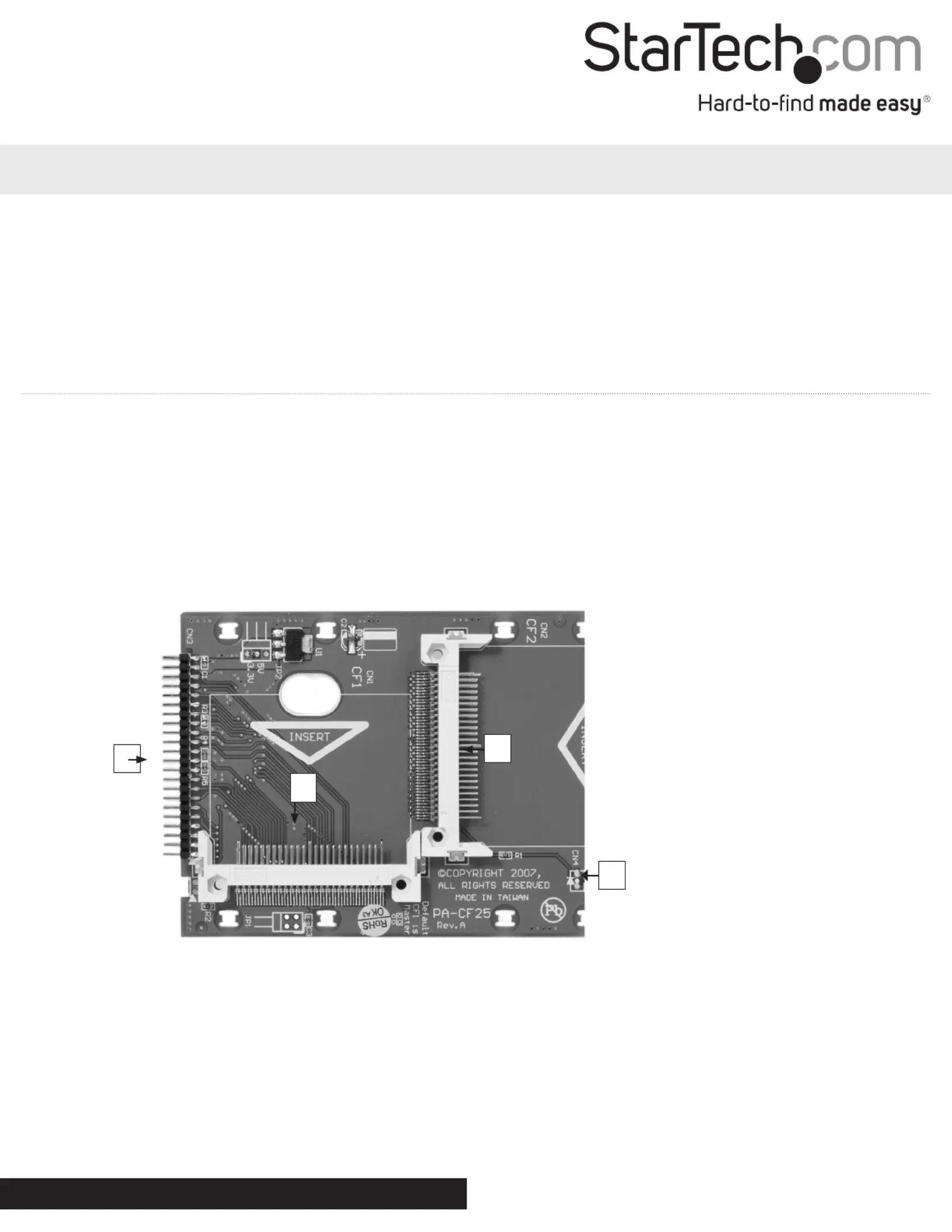
1. Compact Flash Slot #1 (Master)
2. Compact Flash Slot #2 (Slave)
3. IDE (44 pin) Male Connector
4. Activity LED
4
1. With the Compact Flash card/MicroDrive label facing upward (visible), align the holes on the connector
end of the Compact Flash card with the pins provided by the CF2X2IDE25 Compact Flash slot #1.
2. Apply gentle pressure to the Compact Flash/MicroDrive card, until the pins provided by the adapter are
fully inserted into the Compact Flash/MicroDrive connector holes.
3. Repeat steps #1 and #2, by installing a second Compact Flash card/MicroDrive into Compact Flash Slot
#2 (slave drive).
4. Connect the CF2X2IDE25 adapter directly to an available IDE port on the host computer, by aligning the pins provided by the adapter
with the holes provided by a 44 pin IDE port. Once aligned, apply gentle pressure to the board until it is rmly seated within the IDE slot.
Specyfikacje produktu
| Marka: | StarTech.com |
| Kategoria: | Niesklasyfikowane |
| Model: | CF2X2IDE25 |
Potrzebujesz pomocy?
Jeśli potrzebujesz pomocy z StarTech.com CF2X2IDE25, zadaj pytanie poniżej, a inni użytkownicy Ci odpowiedzą
Instrukcje Niesklasyfikowane StarTech.com

9 Stycznia 2025
9 Stycznia 2025
9 Stycznia 2025
9 Stycznia 2025
9 Stycznia 2025
8 Stycznia 2025
8 Stycznia 2025
8 Stycznia 2025
8 Stycznia 2025
8 Stycznia 2025
Instrukcje Niesklasyfikowane
Najnowsze instrukcje dla Niesklasyfikowane
29 Stycznia 2025
29 Stycznia 2025
29 Stycznia 2025
29 Stycznia 2025
29 Stycznia 2025
29 Stycznia 2025
29 Stycznia 2025
29 Stycznia 2025
29 Stycznia 2025
29 Stycznia 2025