Instrukcja obsługi StarTech.com CMSCOILED2
StarTech.com Niesklasyfikowane CMSCOILED2
Przeczytaj poniżej 📖 instrukcję obsługi w języku polskim dla StarTech.com CMSCOILED2 (2 stron) w kategorii Niesklasyfikowane. Ta instrukcja była pomocna dla 29 osób i została oceniona przez 7 użytkowników na średnio 4.7 gwiazdek
Strona 1/2
Quick-Start Guide
To view manuals, FAQs, videos, drivers, downloads, technical drawings, and more, visit www.startech.com/support.
Manual Revision: August 30, 2019
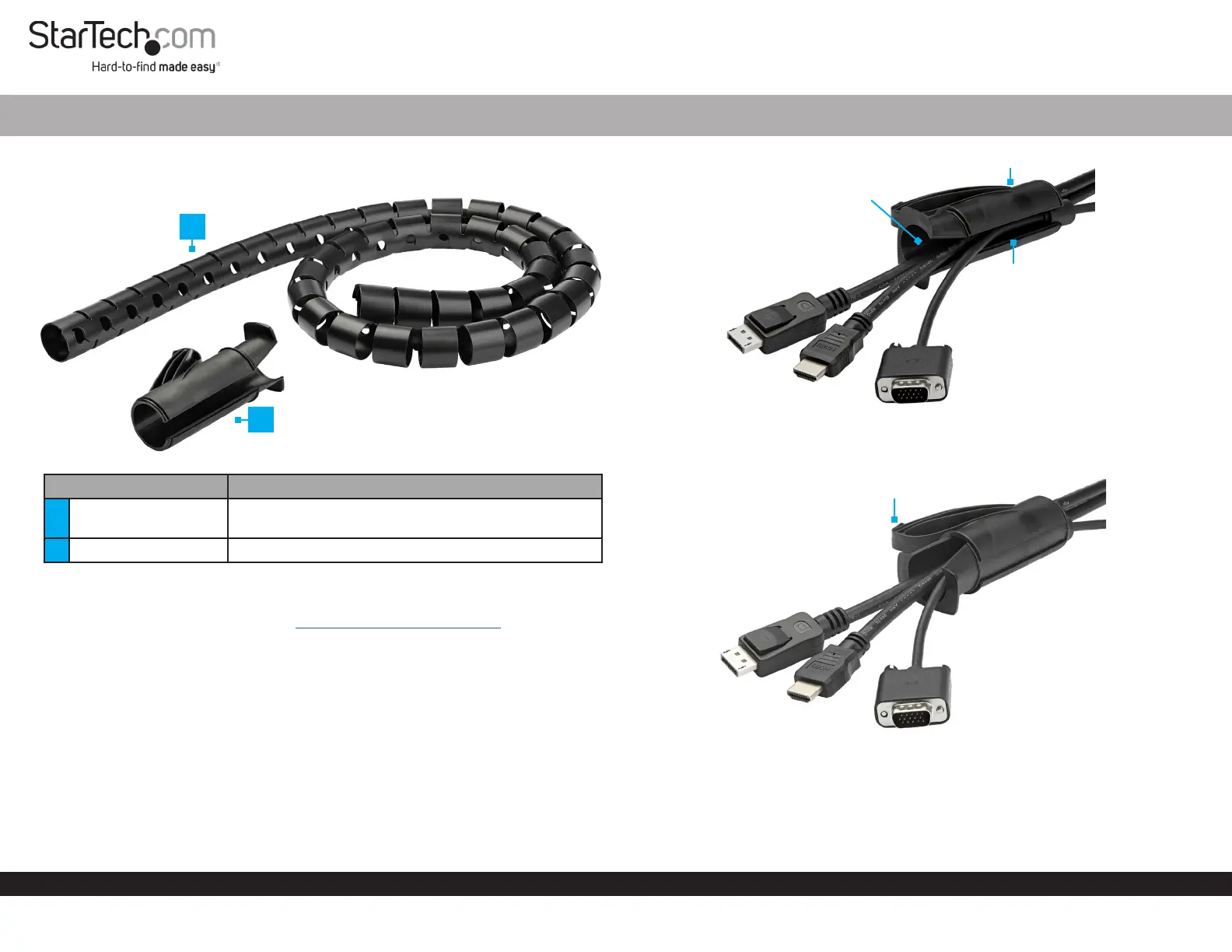
Product Diagram (CMSCOILED)
PartFunction
1
Cable-Management
Sleeve
• Organize Cables into one bundle
2Cable Insertion Tool• Guides Cables into the Cable-Management Sleeve
Requirements
For the latest requirements please visit: www.startech.com/CMSCOILED.
Installation
Basic
1. Open the Cable Channel by rotating the Tube within the Cable Insertion Tool.
2. Feed the Cables into the Cable Insertion Tool though the V-Shaped Opening in
the Tube. (Figure 1)
Spiral Cable-Management Sleeve - Black
3. Rotate the Tube in the Cable Insertion Tool to close the Cable Channel. (Figure 2)
4. Insert the Nose of the Cable Insertion Tool into one end of the Cable-
Management Sleeve.
1
2
Figure 2
Nose
Figure 1
Cable
Channel
V-Shaped
Opening
Tube
Specyfikacje produktu
| Marka: | StarTech.com |
| Kategoria: | Niesklasyfikowane |
| Model: | CMSCOILED2 |
Potrzebujesz pomocy?
Jeśli potrzebujesz pomocy z StarTech.com CMSCOILED2, zadaj pytanie poniżej, a inni użytkownicy Ci odpowiedzą
Instrukcje Niesklasyfikowane StarTech.com

9 Stycznia 2025
9 Stycznia 2025
9 Stycznia 2025
9 Stycznia 2025
9 Stycznia 2025
8 Stycznia 2025
8 Stycznia 2025
8 Stycznia 2025
8 Stycznia 2025
8 Stycznia 2025
Instrukcje Niesklasyfikowane
Najnowsze instrukcje dla Niesklasyfikowane
29 Stycznia 2025
29 Stycznia 2025
29 Stycznia 2025
29 Stycznia 2025
29 Stycznia 2025
29 Stycznia 2025
29 Stycznia 2025
29 Stycznia 2025
29 Stycznia 2025
29 Stycznia 2025