Instrukcja obsługi StarTech.com ET91000LC2
StarTech.com Niesklasyfikowane ET91000LC2
Przeczytaj poniżej 📖 instrukcję obsługi w języku polskim dla StarTech.com ET91000LC2 (2 stron) w kategorii Niesklasyfikowane. Ta instrukcja była pomocna dla 18 osób i została oceniona przez 3 użytkowników na średnio 4.2 gwiazdek
Strona 1/2
Instruction Manual
DE: Bedienungsanleitung - de.startech.com
FR: Guide de l'utilisateur - fr.startech.com
ES: Guía del usuario - es.startech.com
IT: Guida per l'uso - it.startech.com
NL: Gebruiksaanwijzing - nl.startech.com
PT: Guia do usuário - pt.startech.com
Manual Revision: 11/03/2017
For the most up-to-date information, please visit: www.startech.com
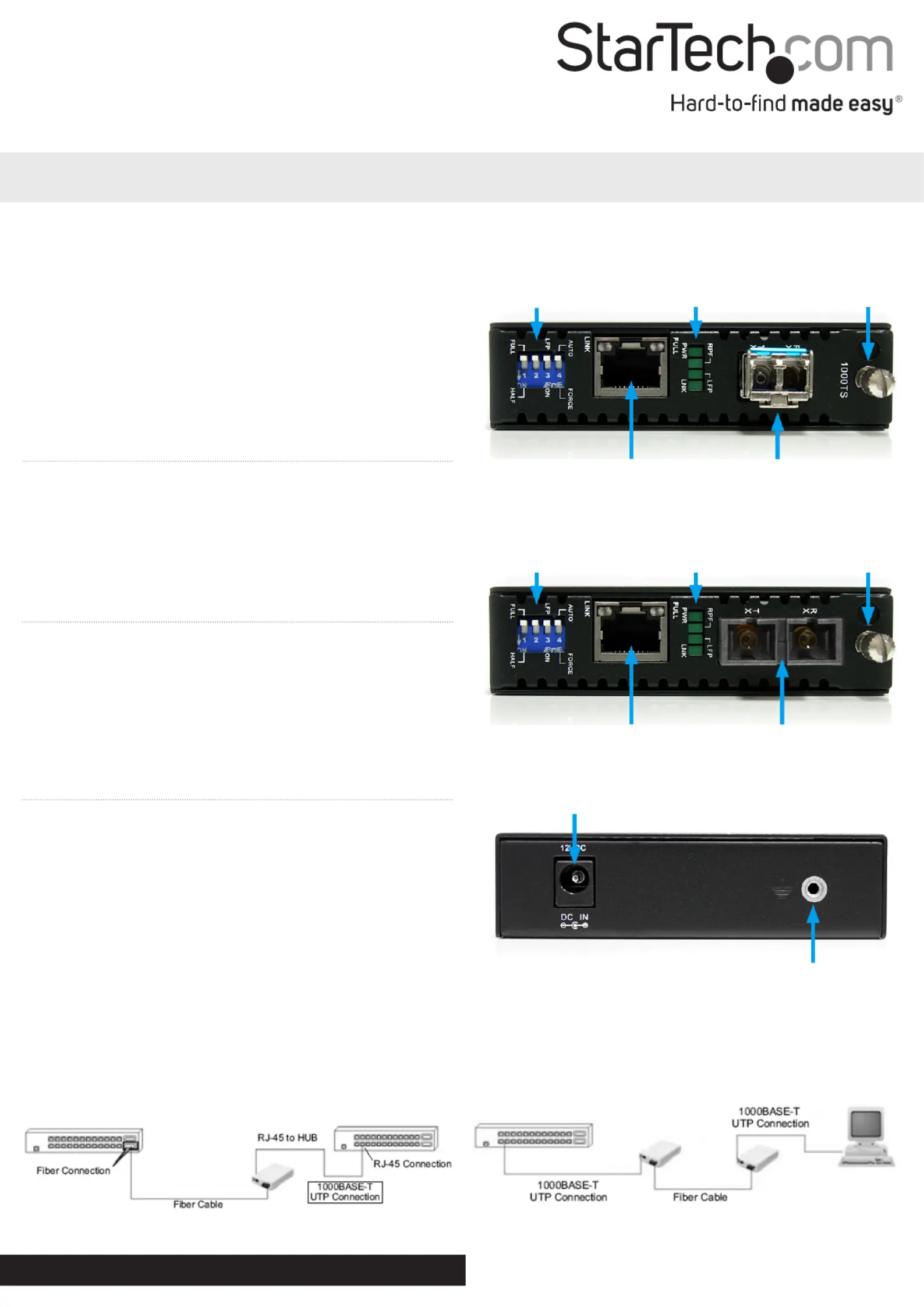
Rear View (ET91000LC2 / ET91000SC2)
ET91000LC2 / ET91000SC2
Gigabit Ethernet to Multi Mode LC/SC Fiber Media Converter - 550m
Packaging Contents
• 1 x Fiber Media Converter
• 1 x Universal Power Adapter
• 4 x Power Adapter Plugs (NA/UK/EU/AU)
• 1 x Grounding Screw
• 1 x Instruction Manual
System Requirements
• 1000BASE-T compatible Ethernet network equipment
• RJ45 terminated UTP Cat5e or better Ethernet cable
• 1000BASE-SX compatible ber optic network equipment
• LC or SC terminated multi mode ber optic cable
• Available AC electrical outlet
Installation
1. Make sure the DIP switches are set appropriately for your network
conguration (see “DIP Switch Settings“ section for details).
2. Connect the ber optic network cable from a computer/switch/
media converter to the LC/SC connector on the media converter.
NOTE: When connecting the ber cable, make sure to connect the
Tx (transmit) terminal on one end, with the Rx (receive) terminal on
the other end.
3. Connect a UTP Ethernet cable, from a computer/switch to the
RJ45 jack on the media converter.
4. Connect the power adapter to the media converter.
5. The following example illustrates the connection scheme when
connecting from a 1000BASE-T Ethernet port of a hub/switch to
a 1000BASE-SX port of another hub/switch, through the ber
media converter:
6. The following example illustrates the connection scheme
when connecting from a 1000BASE-T Ethernet port on a hub/
switch to a 1000BASE-T Ethernet Network Interface Card (NIC)
in a computer through the ber media converter:
Dip SwitchLED Indicators
Card Release
Thumbscrew
RJ45 Ethernet
connector
LC Duplex Fiber
connector
DC Power connector
Ground point (optional)
*actual product may vary from photos
ET91000LC2
Dip Switch
LED Indicators
Card Release
Thumbscrew
RJ45 Ethernet connector
SC Duplex Fiber
connector
ET91000SC2
Specyfikacje produktu
| Marka: | StarTech.com |
| Kategoria: | Niesklasyfikowane |
| Model: | ET91000LC2 |
Potrzebujesz pomocy?
Jeśli potrzebujesz pomocy z StarTech.com ET91000LC2, zadaj pytanie poniżej, a inni użytkownicy Ci odpowiedzą
Instrukcje Niesklasyfikowane StarTech.com

9 Stycznia 2025
9 Stycznia 2025
9 Stycznia 2025
9 Stycznia 2025
9 Stycznia 2025
8 Stycznia 2025
8 Stycznia 2025
8 Stycznia 2025
8 Stycznia 2025
8 Stycznia 2025
Instrukcje Niesklasyfikowane
Najnowsze instrukcje dla Niesklasyfikowane
29 Stycznia 2025
29 Stycznia 2025
29 Stycznia 2025
29 Stycznia 2025
29 Stycznia 2025
29 Stycznia 2025
29 Stycznia 2025
29 Stycznia 2025
29 Stycznia 2025
29 Stycznia 2025