Instrukcja obsługi StarTech.com KEYBOARD-TRAY-CLAMP1
StarTech.com Niesklasyfikowane KEYBOARD-TRAY-CLAMP1
Przeczytaj poniżej 📖 instrukcję obsługi w języku polskim dla StarTech.com KEYBOARD-TRAY-CLAMP1 (2 stron) w kategorii Niesklasyfikowane. Ta instrukcja była pomocna dla 9 osób i została oceniona przez 9 użytkowników na średnio 4.5 gwiazdek
Strona 1/2
Quick-Start Guide
To view manuals, FAQs, videos, drivers, downloads, technical drawings, and more, visit www.startech.com/support
Manual Revision: January 28, 2022 3:27 PM
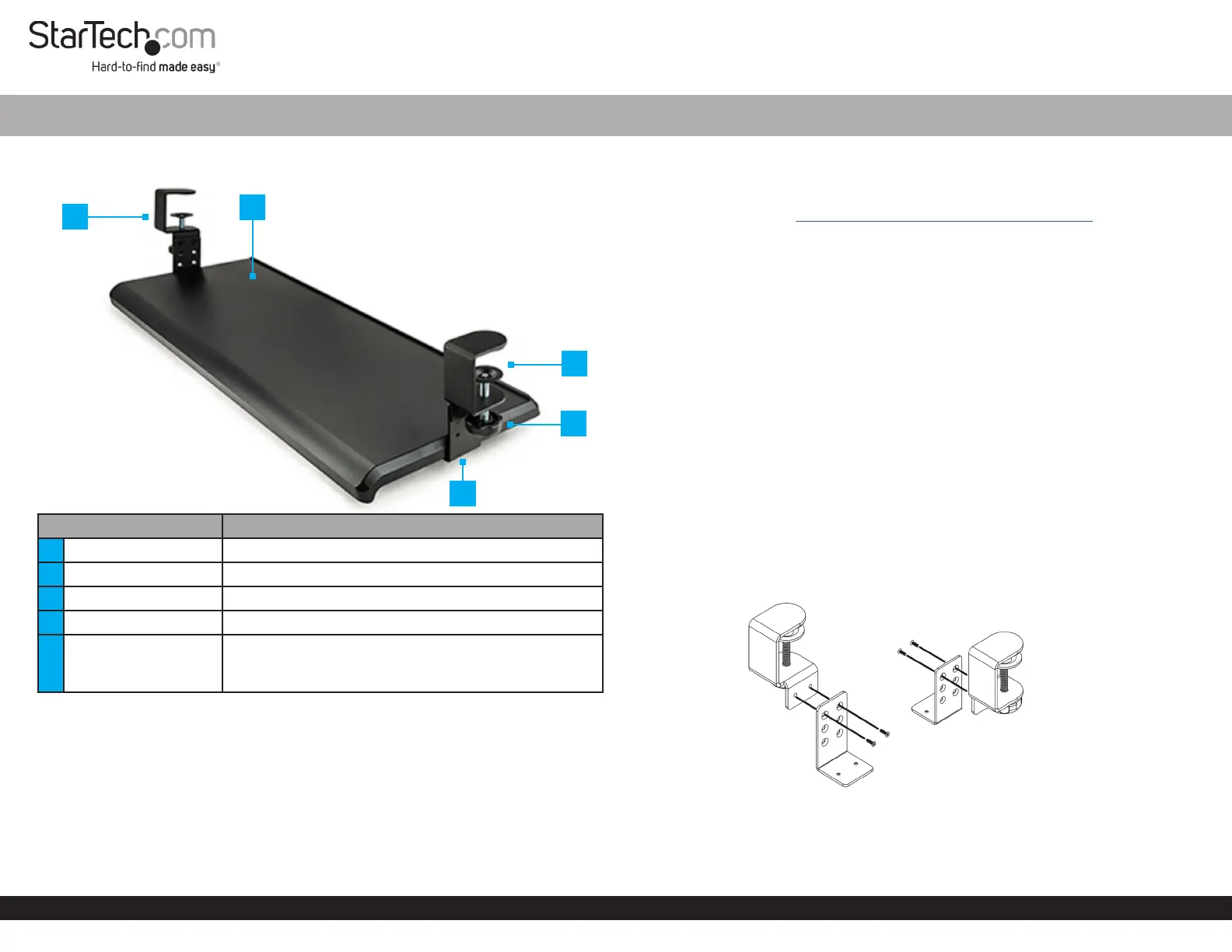
Product Diagram (KEYBOARD-TRAY-CLAMP1)
ComponentFunction
1Desk Clamp, Left• Attach the Keyboard Tray to the Desk
2Keyboard Tray• Place a keyboard and a mouse on the Keyboard Tray
3Desk Clamp, Right• Attach the Keyboard Tray to the Desk
4Clamp Knob• Turn by hand to secure the Clamp to the Desk
5
Height Adjustment L
Bracket
• Adjust the height between the Desk and the
Keyboard Tray
• Attach the Keyboard Tray to the Desk Clamp
Package Contents
• Keyboard Tray x 1
• Height Adjustment Screws x 5
• Tray Mounting Screws x 5
• Height Adjustments L Brackets x 2
• Desk Clamp Left x 1
• Desk Clamp Right x 1
• Quick-star Guide x1
Desk Clamp Keyboard Tray
Requirements
For the latest manuals, product information, technical specications, and declarations of
conformance, please visit: www.startech.com/KEYBOARD-TRAY-CLAMP1
• Phillips Head Screwdriver
Installation
WARNING!
Do not exceed the weight capacity of this product. Overloading this product might
result in injury or property damage. This product can support the following weight: up
to 11.8 kg (26 lbs).
Ensurethe mounted Keyboard Tray is properly secured to the Desk before use.
Attach the Desk Clamp to the Height Adjustment L
Brackets
1. Determine the desired height between the Desk and the Keyboard Tray: 100,
120, or 140 mm (3.9, 4.7, or 5.5 in). Each row of holes on the Height Adjustment
L Bracket are spaced 20 mm apart. The row of holes, located closest to the bend
of the Height Adjustment L Brackets, provides the minimum height adjustment
setting of 100 mm (3.9 in).
2. Secure the Height Adjustment L Bracket to the Desk Clamps using the Height
Adjustment Screws (x2 shorter screws) and tighten using a Phillips Head
Screwdriver to complete the rst Desk Clamp Assembly (Figure 1).
3. Repeat steps 2 and 3 to install the second Desk Clamp Assembly
Attach the Desk Clamp Assemblies to the Keyboard Tray
1. Flip the Keyboard Tray upside down and align the mounting holes located on
3
1
2
5
4
Figure 1
Specyfikacje produktu
| Marka: | StarTech.com |
| Kategoria: | Niesklasyfikowane |
| Model: | KEYBOARD-TRAY-CLAMP1 |
Potrzebujesz pomocy?
Jeśli potrzebujesz pomocy z StarTech.com KEYBOARD-TRAY-CLAMP1, zadaj pytanie poniżej, a inni użytkownicy Ci odpowiedzą
Instrukcje Niesklasyfikowane StarTech.com

9 Stycznia 2025
9 Stycznia 2025
9 Stycznia 2025
9 Stycznia 2025
9 Stycznia 2025
8 Stycznia 2025
8 Stycznia 2025
8 Stycznia 2025
8 Stycznia 2025
8 Stycznia 2025
Instrukcje Niesklasyfikowane
Najnowsze instrukcje dla Niesklasyfikowane
29 Stycznia 2025
29 Stycznia 2025
29 Stycznia 2025
29 Stycznia 2025
29 Stycznia 2025
29 Stycznia 2025
29 Stycznia 2025
29 Stycznia 2025
29 Stycznia 2025
29 Stycznia 2025