Instrukcja obsługi StarTech.com LAPTOP-SIT-STAND
StarTech.com Niesklasyfikowane LAPTOP-SIT-STAND
Przeczytaj poniżej 📖 instrukcję obsługi w języku polskim dla StarTech.com LAPTOP-SIT-STAND (2 stron) w kategorii Niesklasyfikowane. Ta instrukcja była pomocna dla 26 osób i została oceniona przez 9 użytkowników na średnio 4.7 gwiazdek
Strona 1/2
Quick-Start Guide
To view manuals, FAQs, videos, drivers, downloads, technical drawings, and more, visit www.startech.com/support
Manual Revision: May 18, 2022 3:20 PM
3
1
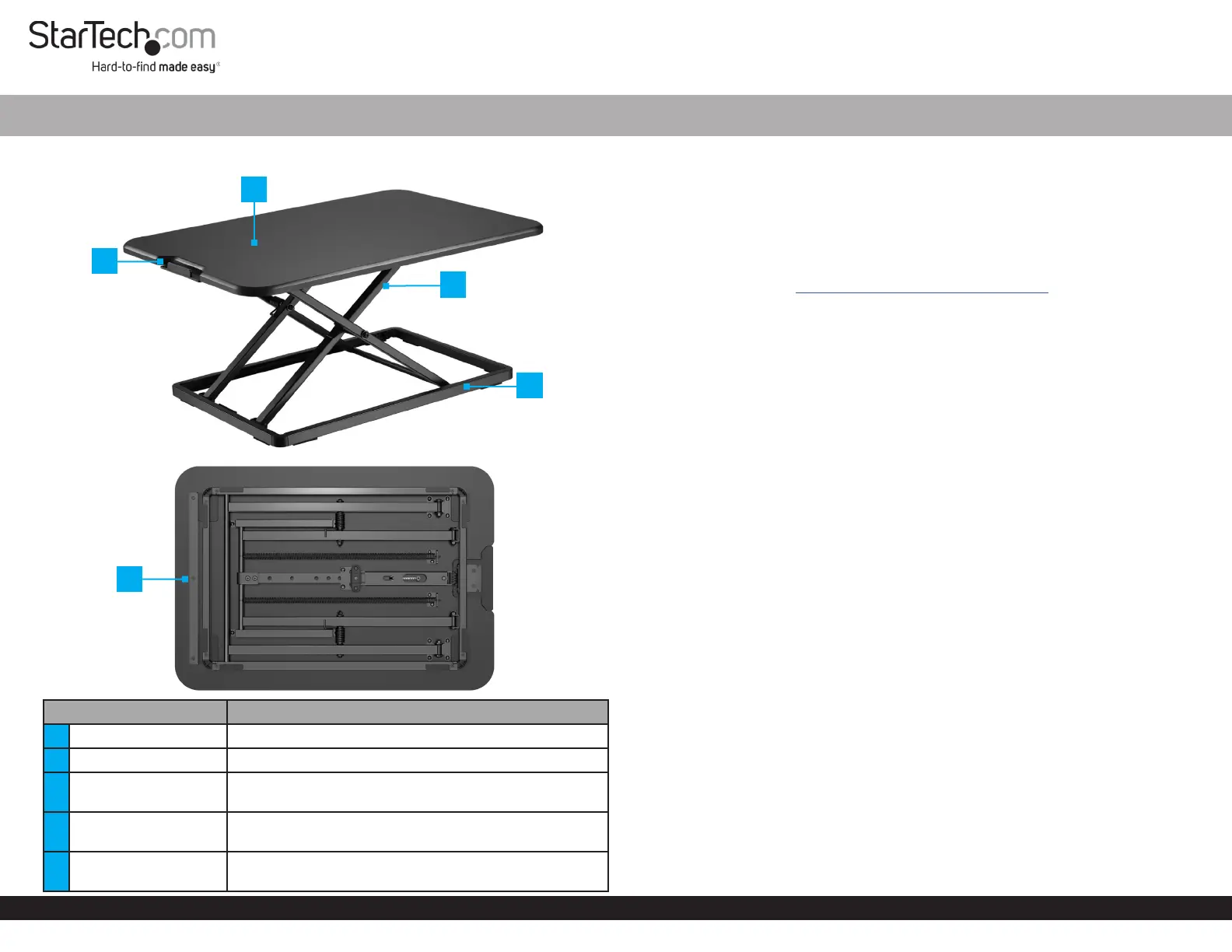
Product Diagram (LAPTOP-SIT-STAND)
Front View
Bottom View
ComponentFunction
1Slide Button• Push-in to Raise or Lower the workstation
2Workstation Surface• Place a laptop, keyboard, and a mouse
3Upper Frame
• Supports the workstation. Adjusts the Height in Six
DierentPositions from 1.8 to 15.9 in (45 to 405 mm)
4Lower Frame
• Stabilizes the workstation. Foam pads at the bottom
protect the desk surface
5Finger Guard
• Helps prevent trapping your ngers when Lowering
the workstation
Ergonomic Adjustable Laptop Sit Stand Desk Converter
Package Contents
• Desktop Sit-Stand Workstation x 1
• Quick-Start Guide x 1
Requirements
For the latest manuals, product information, technical specications, and declarations of
conformance, please visit: www.startech.com/LAPTOP-SIT-STAND
Installation
WARNINGS!
Do not exceed the weight capacity of this product. Overloading this product might
result in injury or property damage. This product can support the following weight: up
to 17.6 lb (8 kg).
When adjusting the height of this product, ensure that the mounted equipment is
properly secured and the weight is supported until the locking mechanism is fully
engaged. Adjust the height at a slow speed to prevent any equipment instability.
Failure to follow these guidelines may result in property damage and/or personal
injury.
Stored Energy Hazard! This product contains a spring mechanism that can cause the
assembly and/or mounted equipment to move forcibly and quickly upwards when the
slide button is pressed.
Pinch Hazard! Keep your ngers clear from moving components. Do not place your
ngers past the nger guard at the bottom of the workstation surface when lowering
it.
1. Cut the security plastic Tie that Holds the Upper Frame to the Lower Frame .
2. Carefully Remove the foam Pad installed on the Slide Button.
Operation
When adjusting the height of this product, always use two hands to ensure a
controlled movement.
Ifthe slide button is pushed in and without releasing, you can adjust the height of the
upper frame in one movement to any of the available height positions. Until the slide
button is released, the height of the upper frame cannot be locked.
Dueto the spacing of the locking holes, the user must continue to support the
workstation weight until the locking mechanism is engaged.
2
4
5
Specyfikacje produktu
| Marka: | StarTech.com |
| Kategoria: | Niesklasyfikowane |
| Model: | LAPTOP-SIT-STAND |
Potrzebujesz pomocy?
Jeśli potrzebujesz pomocy z StarTech.com LAPTOP-SIT-STAND, zadaj pytanie poniżej, a inni użytkownicy Ci odpowiedzą
Instrukcje Niesklasyfikowane StarTech.com

9 Stycznia 2025
9 Stycznia 2025
9 Stycznia 2025
9 Stycznia 2025
9 Stycznia 2025
8 Stycznia 2025
8 Stycznia 2025
8 Stycznia 2025
8 Stycznia 2025
8 Stycznia 2025
Instrukcje Niesklasyfikowane
Najnowsze instrukcje dla Niesklasyfikowane
29 Stycznia 2025
29 Stycznia 2025
29 Stycznia 2025
29 Stycznia 2025
29 Stycznia 2025
29 Stycznia 2025
29 Stycznia 2025
29 Stycznia 2025
29 Stycznia 2025
29 Stycznia 2025