Instrukcja obsługi StarTech.com M2-USB-C-NVME-SATA
StarTech.com Niesklasyfikowane M2-USB-C-NVME-SATA
Przeczytaj poniżej 📖 instrukcję obsługi w języku polskim dla StarTech.com M2-USB-C-NVME-SATA (2 stron) w kategorii Niesklasyfikowane. Ta instrukcja była pomocna dla 63 osób i została oceniona przez 2 użytkowników na średnio 4.6 gwiazdek
Strona 1/2
Quick-Start Guide
To view manuals, FAQs, videos, drivers, downloads, technical drawings, and more, visit www.startech.com/support.
Manual Revision: November 6, 2021 12:28 AM
To view manuals, FAQs, videos, drivers, downloads, technical drawings, and more, visit www.startech.com/support.
Product ID
M2-USB-C-NVME-SATA
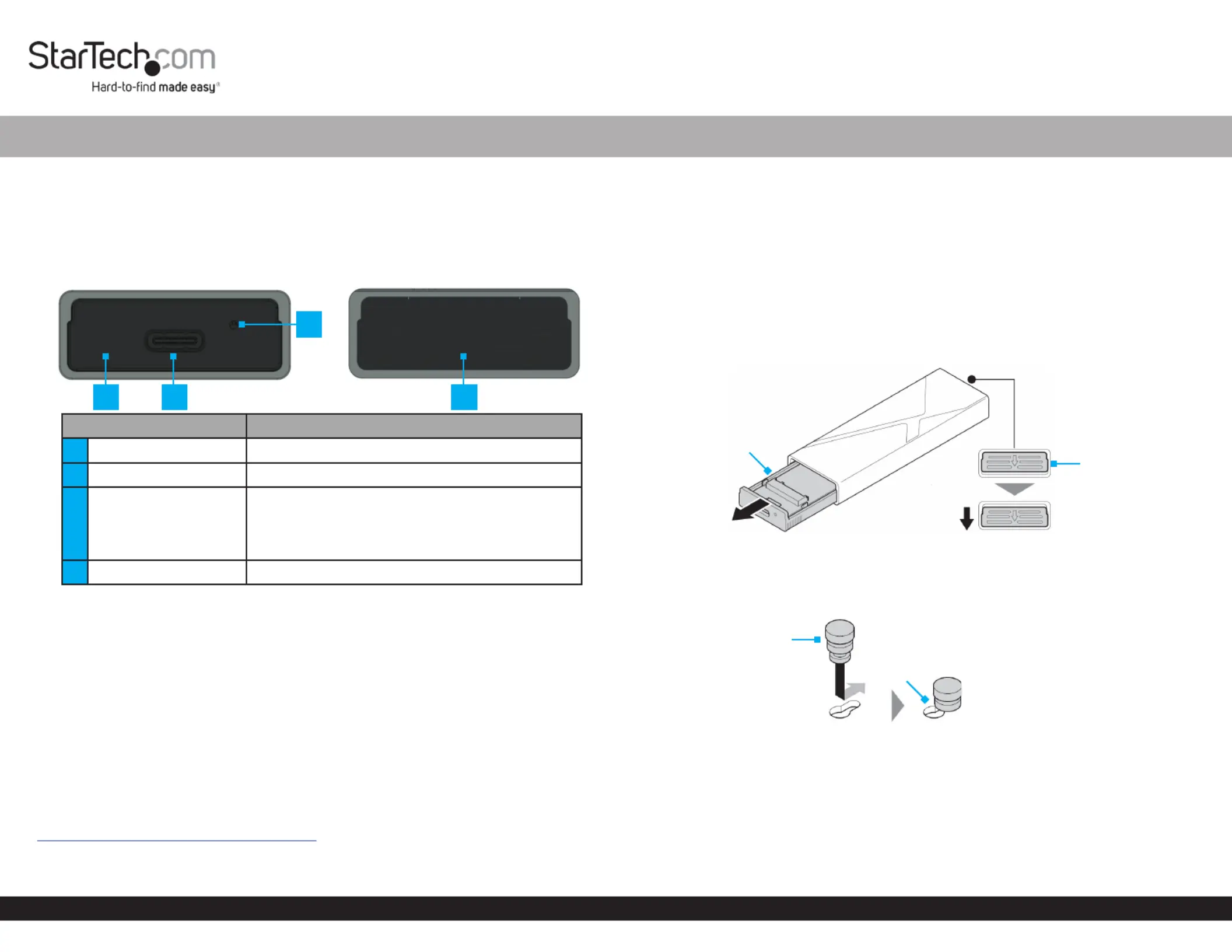
Product Diagram
Front Back
ComponentFunction
1Drive Tray Cover• Enclosure component
2USB-C Port• Connect the to the Enclosure Host Computer
3
Power and Activity
LED Indicator
• Solid BlueEnclosure indicates the is receiving
power
• Flashing BlueDrive indicates read/write
activity
4Drive Tray Release Tab• Pull down to eject the Drive Tray
Package Contents
• M.2 SSD Enclosure x 1
• USB-C to USB-C Cable x 1
• USB-C to USB-A Cable x 1
• Thermal Pad x 1
• SSD Fastener Pegs x 2
• Quick-Start Guide
Product Information
For the latest product information, technical specications, manuals, and Declarations
of Conformance, please visit:
www.StarTech.com/M2-USB-C-NVME-SATA
M.2 SATA/NVMe SSD Enclosure - Tool-less - USB 3.2 (10Gbps) w/ USB-C and USB-A Cables
Product Requirements
• SSD x 1
• M-Key and B+M-Key PCI Express M.2 NVMe and M.2 SATA
• 30 mm, 42 mm, 60 mm, or 80 mm Drive Length
Installation
Install a Drive
Warning! Handle with care.Drives
1. Pull the down to eject the . (Figure 1)Drive Tray Release Tab Drive Tray
2. Carefully pull the out of the . Drive TrayEnclosure
3. Insert one into the that corresponds with the SSD Fastener PegDrive Tray Hole
length of the and slide the into the . (Figure 2)DriveSSD Fastener PegNotch
4. Gently slide the on the at a 30-degree angle into the ConnectorDrive
corresponding , located on the . (Figure 3)Drive ConnectorDrive Tray
Note: The on the is keyed so that it only ts one way.Connector Drive
5. Pull the away from the , lightly push the down into SSD Fastener PegDriveDrive
position on the , and release the . (Figure 3)Drive TraySSD Fastener Peg
1
3
24
Figure 2
SSD Fastener Peg
Notch
Figure 1
Drive Tray
Drive Tray
Release Tab
Specyfikacje produktu
| Marka: | StarTech.com |
| Kategoria: | Niesklasyfikowane |
| Model: | M2-USB-C-NVME-SATA |
Potrzebujesz pomocy?
Jeśli potrzebujesz pomocy z StarTech.com M2-USB-C-NVME-SATA, zadaj pytanie poniżej, a inni użytkownicy Ci odpowiedzą
Instrukcje Niesklasyfikowane StarTech.com

9 Stycznia 2025
9 Stycznia 2025
9 Stycznia 2025
9 Stycznia 2025
9 Stycznia 2025
8 Stycznia 2025
8 Stycznia 2025
8 Stycznia 2025
8 Stycznia 2025
8 Stycznia 2025
Instrukcje Niesklasyfikowane
Najnowsze instrukcje dla Niesklasyfikowane
29 Stycznia 2025
29 Stycznia 2025
29 Stycznia 2025
29 Stycznia 2025
29 Stycznia 2025
29 Stycznia 2025
29 Stycznia 2025
29 Stycznia 2025
29 Stycznia 2025
29 Stycznia 2025