Instrukcja obsługi StarTech.com MCM110SC2EU
StarTech.com Niesklasyfikowane MCM110SC2EU
Przeczytaj poniżej 📖 instrukcję obsługi w języku polskim dla StarTech.com MCM110SC2EU (2 stron) w kategorii Niesklasyfikowane. Ta instrukcja była pomocna dla 19 osób i została oceniona przez 8 użytkowników na średnio 4.5 gwiazdek
Strona 1/2
Instruction Manual
DE: Bedienungsanleitung - de.startech.com
FR: Guide de l'utilisateur - fr.startech.com
ES: Guía del usuario - es.startech.com
IT: Guida per l'uso - it.startech.com
NL: Gebruiksaanwijzing - nl.startech.com
PT: Guia do usuário - pt.startech.com
Manual Revision: 06/13/2011
For the most up-to-date information, please visit: www.startech.com
MCM110SC2 / MCM110SC2GB / MCM110SC2EU
MCM110ST2 / MCM110ST2GB / MCM110ST2EU
10/100 Ethernet to 100Base-FX Multi-Mode Fiber Media Converter - 2KM
Packaging Contents
• 1 x Fiber/Ethernet media converter
• 1 x Power Adapter
• 1 x Instruction Manual
System Requirements
• 10/100Base-TX compatible Ethernet network
• 100Base-FX ber network
• SC multi-mode ber cable
• Available AC electrical outlet
Installation
1. Connect the Ethernet cable to the Fiber Media Converter
“LAN” port.
2. Connect the other end of the Ethernet cable to the router/
switch/computer NIC.
3. Connect the ber cable into the ber receptacle on the
media converter.
4. Plug the provided power adapter into the media converter,
and into an available AC power outlet.
5. Connect the other end of the ber cable into the router/
switch/computer NIC/another media converter. Remember
to reverse the TX and RX leads between the two devices.
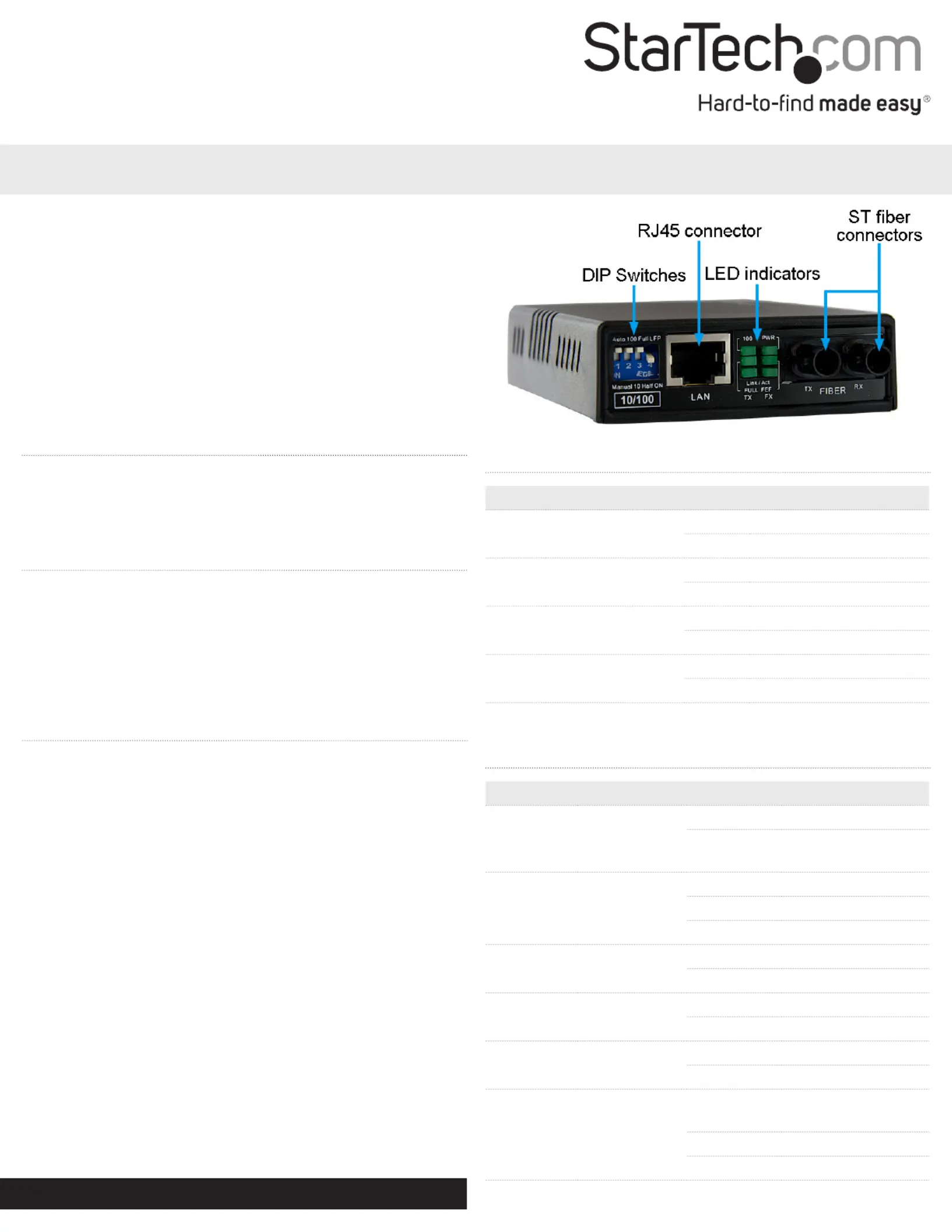
DIP Switch Settings
SwitchFunctionStateStatus
SW1UTP Mode
AutoAuto UTP detection
ManualUse manual UTP settings
SW2*UTP Speed
100100Mbps link speed
1010Mbps link speed
SW3*UTP Duplex
FullFull duplex
HalfHalf duplex
SW4
Link Fault Pass-
through
LFPLFP mode o
ONLFP mode on
*not enabled when SW1 set to ‘Auto’
LED Indicators
LEDFunctionStateStatus
PWR
Power
Indicator
ONConverter has power
OFF
Converter has no
power
FX Link/Act
Fiber Link/
Activity
ONFiber link OK
OFFNo link detected
FlashingReceiving data
FEFFar End Fault
ONFar end link failure
OFFNo failure detected
100Mode
ON100Mbps
OFF10Mbps
FullDuplex Mode
ONFull duplex mode
OFFHalf duplex mode
TX Link/Act
Ethernet Link/
Activity
ON
Ethernet link
detected
OFFNo link detected
FlashingReceiving data
*MCM110ST2 shown
Specyfikacje produktu
| Marka: | StarTech.com |
| Kategoria: | Niesklasyfikowane |
| Model: | MCM110SC2EU |
Potrzebujesz pomocy?
Jeśli potrzebujesz pomocy z StarTech.com MCM110SC2EU, zadaj pytanie poniżej, a inni użytkownicy Ci odpowiedzą
Instrukcje Niesklasyfikowane StarTech.com

9 Stycznia 2025
9 Stycznia 2025
9 Stycznia 2025
9 Stycznia 2025
9 Stycznia 2025
8 Stycznia 2025
8 Stycznia 2025
8 Stycznia 2025
8 Stycznia 2025
8 Stycznia 2025
Instrukcje Niesklasyfikowane
Najnowsze instrukcje dla Niesklasyfikowane
29 Stycznia 2025
29 Stycznia 2025
29 Stycznia 2025
29 Stycznia 2025
29 Stycznia 2025
29 Stycznia 2025
29 Stycznia 2025
29 Stycznia 2025
29 Stycznia 2025
29 Stycznia 2025