Instrukcja obsługi StarTech.com PS74ADF-SERIAL-CARD
StarTech.com Niesklasyfikowane PS74ADF-SERIAL-CARD
Przeczytaj poniżej 📖 instrukcję obsługi w języku polskim dla StarTech.com PS74ADF-SERIAL-CARD (2 stron) w kategorii Niesklasyfikowane. Ta instrukcja była pomocna dla 18 osób i została oceniona przez 2 użytkowników na średnio 4.6 gwiazdek
Strona 1/2
Quick-Start Guide
To view manuals, FAQs, videos, drivers, downloads, technical drawings, and more, visit www.startech.com/support.
Manual Revision: September 29, 2023
Product ID
2S232422485-PC-CARD
PS74ADF-SERIAL-CARD
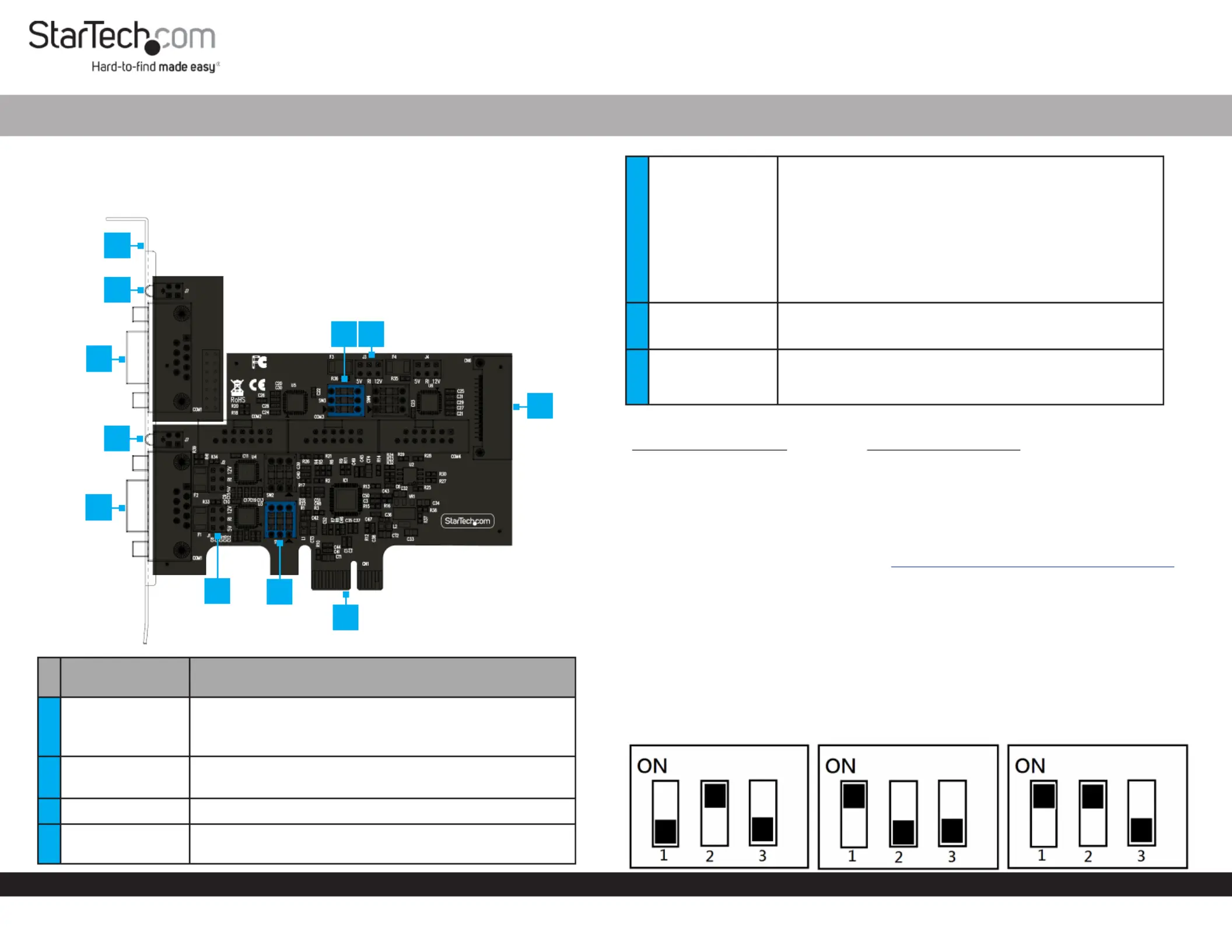
Port/LED/
Connector
Function
1Bracket
• Secures the card to the Host Computer Case
• Thecomes pre-installed Full Prole Bracket
• Theis included Low Prole Bracket
2Activity LEDs
• Data Receive LED: GreenFlash to show activity
• Data Transmit LED: YellowFlash to show activity
3DB9 Serial Ports• Connect Serial Peripheral Devices
4
Serial Mode
Switch
• Change thebetween, , DB9 Serial Ports RS-232RS-422
or RS-485
PCIe p1-x1 RS232/422/485 Serial Card - Low-Prole Brackets Included
5
J1/J2/J3/J4
Jumper
• Optional: Used to change the of Voltage Output DB9
Pin 9
• RI DB9 Pin 9disables power on . This is the default
setting.
• 12VSATA Power Connector draws power from the
(12VOutputs )
• 5V SATA Power Connector draws power from the
(5VOutputs)
6
PCIe p1-x1
Connector
• Insert into a on thePCI Express Slot Host Computer
7
SATA Power
Connector
• Optional: Connect an available SATA Power Connector
from the to provide power over Host Power Supply
DB9 Pin 9
Package Contents
2S232422485-PC-CARD:
• Serial Card x 1
• Low-Prole Bracket x 2
• Ribbon Cable x 1
• Quick-Start Guide x 1
Requirements
For the latest requirements, please visit: www.StarTech.com/2S232422485-PC-CARD
• Computer with an available PCI Express Slot (x1, x4, x8, or x16)
Installation
DIP Switch Settings
To change the between , , and , use the DB9 Serial Ports RS-232RS-422RS-485
respective located on the . enables/Serial Mode SwitchSerial CardDip Switch 3
disables a , used for impedance matching between the 120 Ω Termination Resistor
Tx+/Tx- and Rx+/Rx- (RS-422/RS-485 4-wire) and D+/D- (RS-485 2-wire) lines. The
purpose is to prevent reections on the line that may cause signal errors.
RS-232
RS-485 (Half-Duplex)
RS-422/485 (Full-Duplex)
1
3
3
2
2
6
4
4
5
5
7
*2S232422485-PC-CARD shown above
PS74ADF-SERIAL-CARD:
• Serial Card x 1
• Low-Prole Bracket x 4
• Ribbon Cable x 3
• Quick-Start Guide x 1
Specyfikacje produktu
| Marka: | StarTech.com |
| Kategoria: | Niesklasyfikowane |
| Model: | PS74ADF-SERIAL-CARD |
Potrzebujesz pomocy?
Jeśli potrzebujesz pomocy z StarTech.com PS74ADF-SERIAL-CARD, zadaj pytanie poniżej, a inni użytkownicy Ci odpowiedzą
Instrukcje Niesklasyfikowane StarTech.com

9 Stycznia 2025
9 Stycznia 2025
9 Stycznia 2025
9 Stycznia 2025
9 Stycznia 2025
8 Stycznia 2025
8 Stycznia 2025
8 Stycznia 2025
8 Stycznia 2025
8 Stycznia 2025
Instrukcje Niesklasyfikowane
Najnowsze instrukcje dla Niesklasyfikowane
29 Stycznia 2025
29 Stycznia 2025
29 Stycznia 2025
29 Stycznia 2025
29 Stycznia 2025
29 Stycznia 2025
29 Stycznia 2025
29 Stycznia 2025
29 Stycznia 2025
29 Stycznia 2025