Instrukcja obsługi StarTech.com SHELF-2U-14-CENTER-V
StarTech.com Niesklasyfikowane SHELF-2U-14-CENTER-V
Przeczytaj poniżej 📖 instrukcję obsługi w języku polskim dla StarTech.com SHELF-2U-14-CENTER-V (2 stron) w kategorii Niesklasyfikowane. Ta instrukcja była pomocna dla 30 osób i została oceniona przez 5 użytkowników na średnio 4.1 gwiazdek
Strona 1/2
Quick-Start Guide
To view manuals, FAQs, videos, drivers, downloads, technical drawings, and more, visit www.startech.com/support.
Manual Revision: April 27, 2022 3:01 PM
To view manuals, FAQs, videos, drivers, downloads, technical drawings, and more, visit www.startech.com/support.
Product IDs
SHELF-2U-14-CENTER-V
SHELF-2U-20-CENTER-V
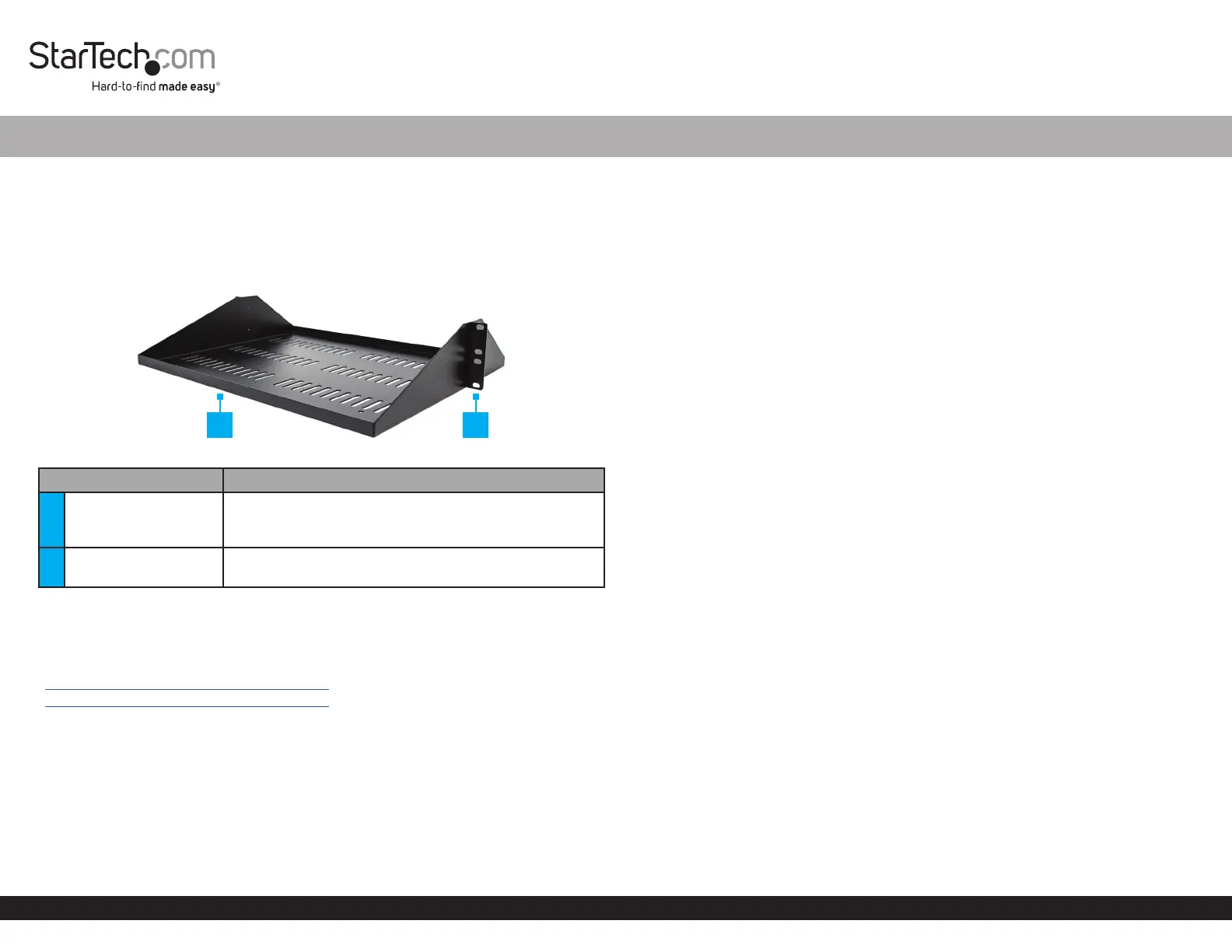
Product Diagram
Front - Angled View
ComponentFunction
1Shelf Lip
• Mount the 2U Vented Center-Mount Shelf with the
Shelf Lip oriented upwards to prevent Equipment
from slipping o
2Mounting Holes (x 8)
• Mount the 2U Vented Center-Mount Shelf into a
Rack.
Product Information
For the latest manuals, product information, technical specications, and declarations
of conformance, please visit:
www.StarTech.com/SHELF-2U-14-CENTER-V
www.StarTech.com/SHELF-2U-20-CENTER-V
Requirements
• 2U Available Rack Space
• Phillips Head Screwdriver
• (Optional) Cage Nut Tool
2U Vented Center-Mount Shelf - 14/20 in. Depth
Warnings
• Read the entire manual and ensure the instructions are fully understood before
assembling and/or using this product.
• Before adding equipment to this product, ensure this product has been properly
mounted.
• Ensure the weight of the equipment does not exceed the weight capacity of this
product. If the weight capacity is exceeded, personal injury or damage to the
equipment are possibilities. This product can support the following weight: up to
200.6 lb. (91 kg). This product can only support the maximum weight capacity if 8
M6 Screws / Cage Nuts / Plastic Washers are used to ax this product to a rack.
Package Contents
• 2U Vented Center-Mount Shelf x 1
• M6 Cage Nuts x 10
• M6 Screws x 10
• M6 Plastic Washers x 10
• Quick-Start Guide x 1
Installation
Mount the 2U Vented Center-Mount Shelf into a Rack
Use the included M6 Cage Nuts, M6 Screws, and M6 Plastic Washers to install the 2U
Vented Center-Mount Shelf.
Notes: This product can support the following weight: 200.6 lb. (91 kg).
The following installation instructions are for square mounting holes.
1. Locate a suitable location in a Rack to mount the 2U Vented Center-Mount Shelf.
Note: The 2U Vented Center-Mount Shelfitself requires 2U of space within a Rack.
2. Insert the Wing (side) of an M6 Cage Nut into the back of the a Cage Nut Hole.
3. Insert the second Wing of the M6 Cage Nut into the selected Cage Nut Hole, using
pressure by hand, or with a Cage Nut Tool.
4. Repeat steps 2 and 3 to insert a total of 8 Cage Nuts.
5. Thread an M6 Plastic Washer over an M6 Screw. Repeat until 8 M6 Screw
Assemblies have been prepared.
1
*Product may vary from image
2
Specyfikacje produktu
| Marka: | StarTech.com |
| Kategoria: | Niesklasyfikowane |
| Model: | SHELF-2U-14-CENTER-V |
Potrzebujesz pomocy?
Jeśli potrzebujesz pomocy z StarTech.com SHELF-2U-14-CENTER-V, zadaj pytanie poniżej, a inni użytkownicy Ci odpowiedzą
Instrukcje Niesklasyfikowane StarTech.com

9 Stycznia 2025
9 Stycznia 2025
9 Stycznia 2025
9 Stycznia 2025
9 Stycznia 2025
8 Stycznia 2025
8 Stycznia 2025
8 Stycznia 2025
8 Stycznia 2025
8 Stycznia 2025
Instrukcje Niesklasyfikowane
Najnowsze instrukcje dla Niesklasyfikowane
29 Stycznia 2025
29 Stycznia 2025
29 Stycznia 2025
29 Stycznia 2025
29 Stycznia 2025
29 Stycznia 2025
29 Stycznia 2025
29 Stycznia 2025
29 Stycznia 2025
29 Stycznia 2025