Instrukcja obsługi StarTech.com UDCMTRAY
StarTech.com Niesklasyfikowane UDCMTRAY
Przeczytaj poniżej 📖 instrukcję obsługi w języku polskim dla StarTech.com UDCMTRAY (2 stron) w kategorii Niesklasyfikowane. Ta instrukcja była pomocna dla 30 osób i została oceniona przez 2 użytkowników na średnio 4.1 gwiazdek
Strona 1/2
Quick-Start Guide
To view manuals, FAQs, videos, drivers, downloads, technical drawings, and more, visit www.startech.com/support.
Manual Revision: November 12, 2020
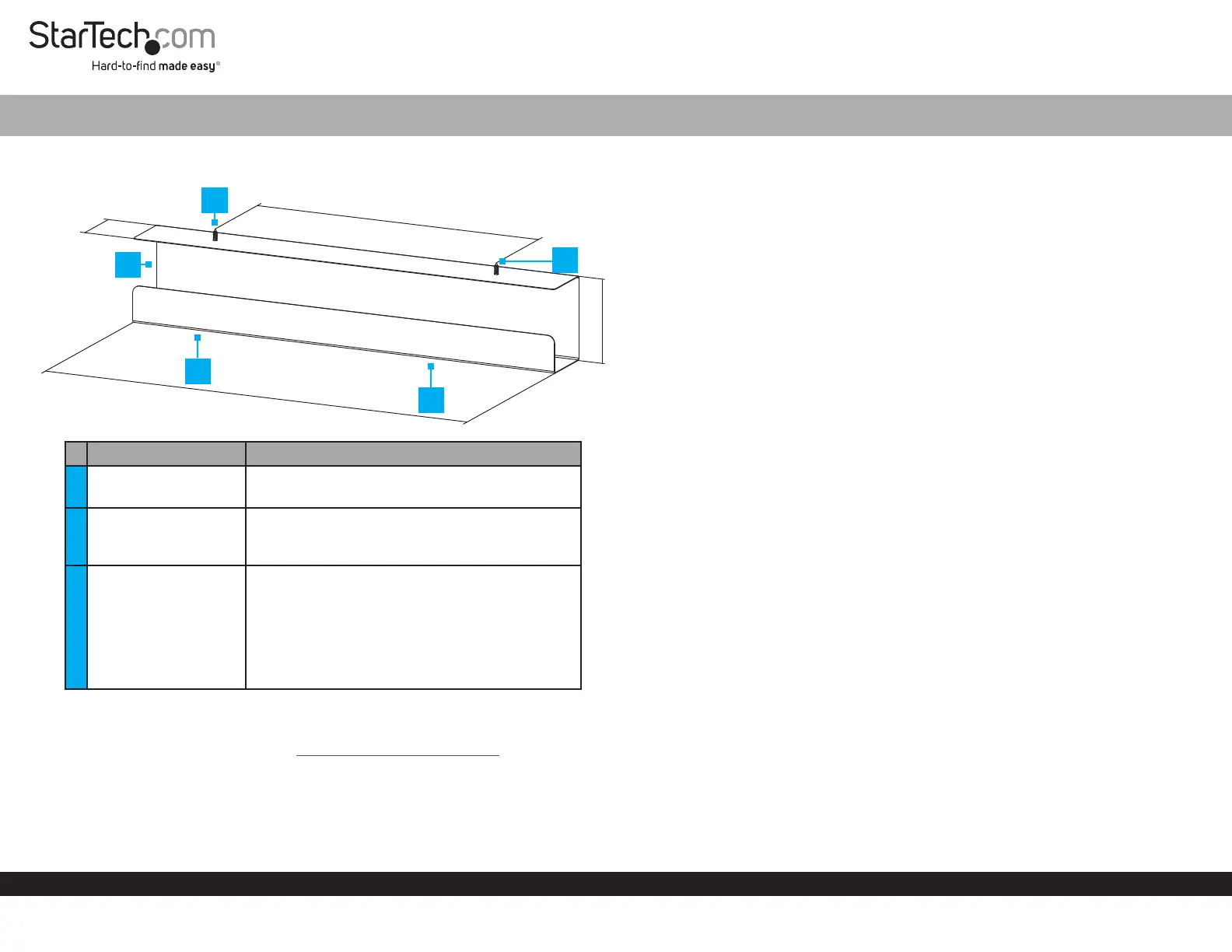
Product Diagram (UDCMTRAY)
ComponentsFunction
1Cable Tray Organizer
• Organize and hide Cables
• Hide a Power Strip
2
Mounting Holes/
Screws
• Mount the Cable Tray Organizer underneath
a Desk
• #12 Phillips® Head Screws
3
Screwdriver Access
Holes
• Cutouts that allow a Phillips Head
Screwdriver or a Phillips Head Drill Bit to
pass through the bottom of the Cable Tray
Organizer
Note: A long Phillips Head Screwdriver or a
Drill Bit Extension may be required to fasten the
Mounting Screws.
Requirements
For the latest requirements, please visit www.startech.com/UDCMTRAY.
• #3 Phillips Head Screwdriver or a Power Drill with a Phillips Head Bit x 1
• Power Drill with a Drill Bit x 1
• Pencil x 1
• (Optional) Drill Bit Extension x 1
Under Desk Cable Tray Organizer
Installation
Note: It is easier to complete the following installation steps with two people.
1. Hold the Cable Tray Organizer in the desired location under the Desk, with the
Mounting Holes resting against the underside of the Desk.
2. Mark the location of the Mounting Holes using a Pencil.
3. Use a Power Drill with an appropriately sized Drill Bit to drill Pilot Holes into the
locations of the Mounting Holes.
Notes: The Pilot Holes should be the same depth as the length of the Mounting
Screws. A small piece of tape can be placed on the Drill Bit to mark the proper depth
of the Pilot Holes.
The Drill Bit size will be determined by the wood used to construct the Desk. Consult a
professional if you are unable to determine the proper Drill Bit size.
4. Insert the Mounting Screws through the Mounting Holes and into the Desk.
(Figure 1)
5. Fasten the Screws into the Desk using a Phillips Head Screwdriver or a Power
Drill with a Phillips Head Bit.
114mm
76mm
600mm
400mm
1
2
2
3
3
Specyfikacje produktu
| Marka: | StarTech.com |
| Kategoria: | Niesklasyfikowane |
| Model: | UDCMTRAY |
Potrzebujesz pomocy?
Jeśli potrzebujesz pomocy z StarTech.com UDCMTRAY, zadaj pytanie poniżej, a inni użytkownicy Ci odpowiedzą
Instrukcje Niesklasyfikowane StarTech.com

9 Stycznia 2025
9 Stycznia 2025
9 Stycznia 2025
9 Stycznia 2025
9 Stycznia 2025
8 Stycznia 2025
8 Stycznia 2025
8 Stycznia 2025
8 Stycznia 2025
8 Stycznia 2025
Instrukcje Niesklasyfikowane
Najnowsze instrukcje dla Niesklasyfikowane
29 Stycznia 2025
29 Stycznia 2025
29 Stycznia 2025
29 Stycznia 2025
29 Stycznia 2025
29 Stycznia 2025
29 Stycznia 2025
29 Stycznia 2025
29 Stycznia 2025
29 Stycznia 2025