Instrukcja obsługi StarTech.com USB2004EXT100
StarTech.com Niesklasyfikowane USB2004EXT100
Przeczytaj poniżej 📖 instrukcję obsługi w języku polskim dla StarTech.com USB2004EXT100 (2 stron) w kategorii Niesklasyfikowane. Ta instrukcja była pomocna dla 17 osób i została oceniona przez 9 użytkowników na średnio 4.6 gwiazdek
Strona 1/2
Quick-Start Guide
To view manuals, FAQs, videos, drivers, downloads, technical drawings, and more, visit www.startech.com/support.
Manual Revision: June 1, 2021 9:14 AM
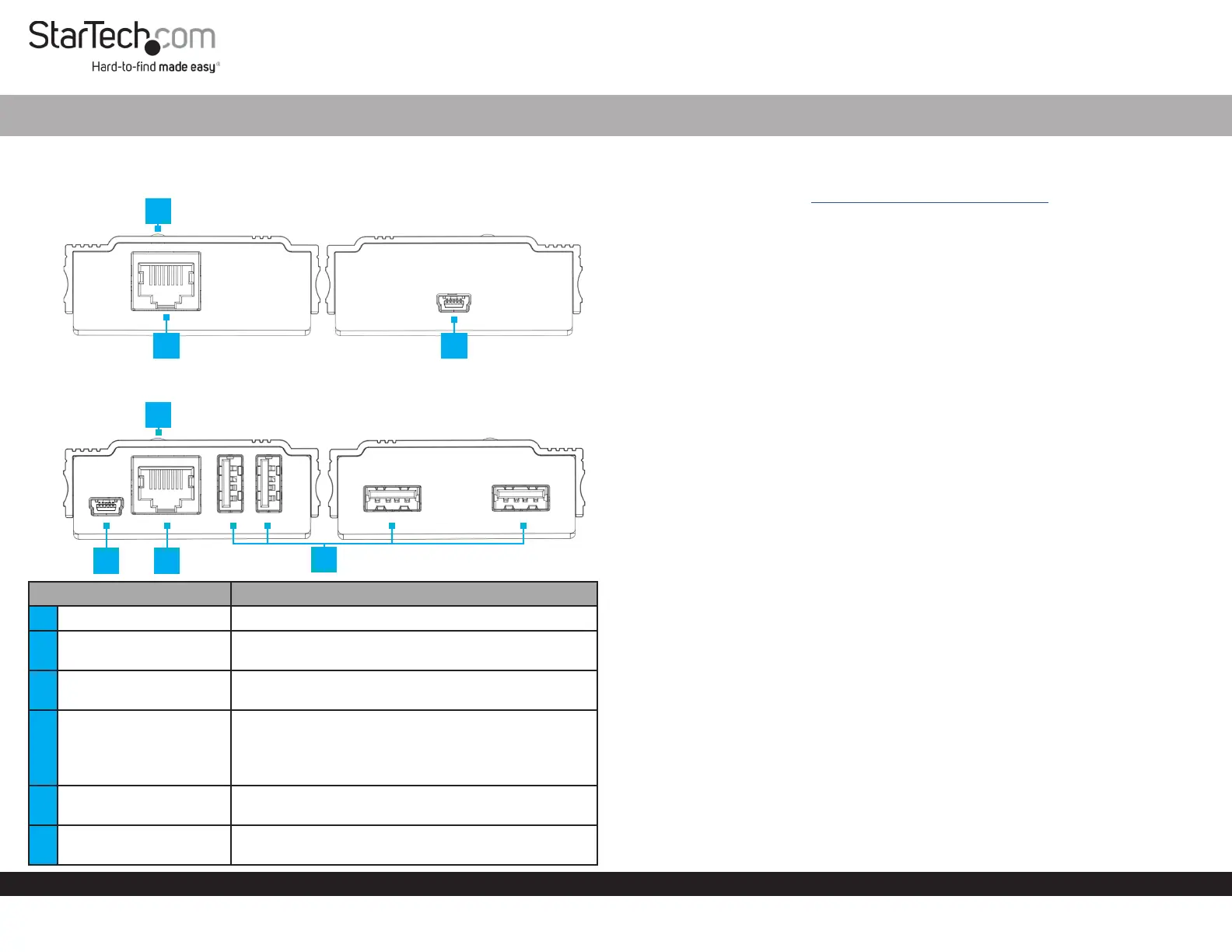
Product Diagram (USB2004EXT100)
Local Transmitter
Remote Receiver
ComponentFunction
1Status LED (Local)• Green: The Local Transmitter is receiving power
2
RJ45 Link Port (Local/
Remote)
• Connect a Cat5e Cable (or better) between the
Local Transmitter and Remote Receiver
3USB Mini-B Host Port
• Connect the Local Extender to the Host Computer
using a USB-A to USB Mini-B Cable
4Status LED (Remote)
• Red: The RemoteReceiver is receiving power but
not linked to the Local Transmitter
• Blue: The RemoteReceiver is receiving power and
linked to the Local Transmitter
5USB Mini-B Power Port
• Connect the Remote Receiver to the USB Power
Adapter using a USB-A to USB Mini-B Cable
6USB-A Port
• Connect USB Peripheral Devices to the Remote
Receiver
4 Port 100m USB 2.0 Extender over CAT5e
Product Information
For the latest product information, technical specications, manuals, and Declarations
of Conformance please visit: www.StarTech.com/USB2004EXT100
Package Contents
• Local Transmitter x 1
• Remote Receiver x 1
• USB-A to USB Mini-B Cables x 2
• CAT5e Cable x 1
• Universal Power Adapter (NA/JP, EU, UK, ANZ) x 1
• Rubber Feet x 8
• Quick-Start Guide x 1
Installation
1. Position the Local Transmitter near the Host Computer.
2. Position the Remote Receiver near an AC Electrical Outlet.
3. Connect a Cat5e Cable (or better) to the RJ45 Link Port on the Local Transmitter
and the other end to the RJ45 Link Port on the Remote Receiver.
Note: The Cat5e Cabling cannot go through any networking equipment (router,
switch, etc.).
4. Connect USB Devices to the USB-A Ports on the Remote Receiver.
5. Plug the Universal Power Adapter into the AC Electrical Outlet
6. Connect the Universal Power Adapter to the USB Mini-B Power Port on the
Remote Receiver using a USB-A to USB Mini-B Cable.
7. Connect the Host Computer to the USB Mini-B Host Port on the Local Transmitter
using a USB-A to USB Mini-B Cable.
23
1
5
6
4
2
Specyfikacje produktu
| Marka: | StarTech.com |
| Kategoria: | Niesklasyfikowane |
| Model: | USB2004EXT100 |
Potrzebujesz pomocy?
Jeśli potrzebujesz pomocy z StarTech.com USB2004EXT100, zadaj pytanie poniżej, a inni użytkownicy Ci odpowiedzą
Instrukcje Niesklasyfikowane StarTech.com

9 Stycznia 2025
9 Stycznia 2025
9 Stycznia 2025
9 Stycznia 2025
9 Stycznia 2025
8 Stycznia 2025
8 Stycznia 2025
8 Stycznia 2025
8 Stycznia 2025
8 Stycznia 2025
Instrukcje Niesklasyfikowane
Najnowsze instrukcje dla Niesklasyfikowane
29 Stycznia 2025
29 Stycznia 2025
29 Stycznia 2025
29 Stycznia 2025
29 Stycznia 2025
29 Stycznia 2025
29 Stycznia 2025
29 Stycznia 2025
29 Stycznia 2025
29 Stycznia 2025