Instrukcja obsługi StarTech.com USB2IR2
StarTech.com Niesklasyfikowane USB2IR2
Przeczytaj poniżej 📖 instrukcję obsługi w języku polskim dla StarTech.com USB2IR2 (4 stron) w kategorii Niesklasyfikowane. Ta instrukcja była pomocna dla 26 osób i została oceniona przez 3 użytkowników na średnio 4.1 gwiazdek
Strona 1/4
Introduction
Thank you for purchasing a StarTech.com USB
to IrDA (IR) Mini Adapter.The perfect solution
for transferring data to and from portable
devices, the adapter allows you to establish a
wireless gateway for desktop or notebook com-
puters to transfer data using an infrared signal
via an available USB port.Supporting data
transfer rates of up to 115.2Kbps with an effec-
tive range of about one meter, USB2IR2 is ideal
for communicating with PDAs, Cell Phones and
more.
Features
• Compliant with IrDA specification V1.3
• USBPowered, no adapter required
• Fully compliant with USB spec.Rev.1.1
• Maximum operating distance of 1 Metre
System Requirements
• Windows 98, 98SE, ME, 2000, XP or
Windows Vista TM operating system
• An available USB port
Package Contents
• 1 x USB IR Adapter
• 1 x 2’ (0.6 metre) USB A-A M/F Extension
Cable
• 1 x Software/Driver CD
• 1 x Instruction Manual
U
U
U
U
US
S
S
S
SB
B
B
B
B
t
t
t
t
to
o
o
o
o
I
I
I
I
Ir
r
r
r
rD
D
D
D
DA
A
A
A
A (
(
(
(
(I
I
I
I
IR
R
R
R
R)
)
)
)
) M
M
M
M
Mi
i
i
i
in
n
n
n
ni
i
i
i
i
A
A
A
A
Ad
d
d
d
da
a
a
a
ap
p
p
p
pt
t
t
t
te
e
e
e
er
r
r
r
r
U
U
U
U
US
S
S
S
SB
B
B
B
B2
2
2
2
2I
I
I
I
IR
R
R
R
R2
2
2
2
2
Installation
1
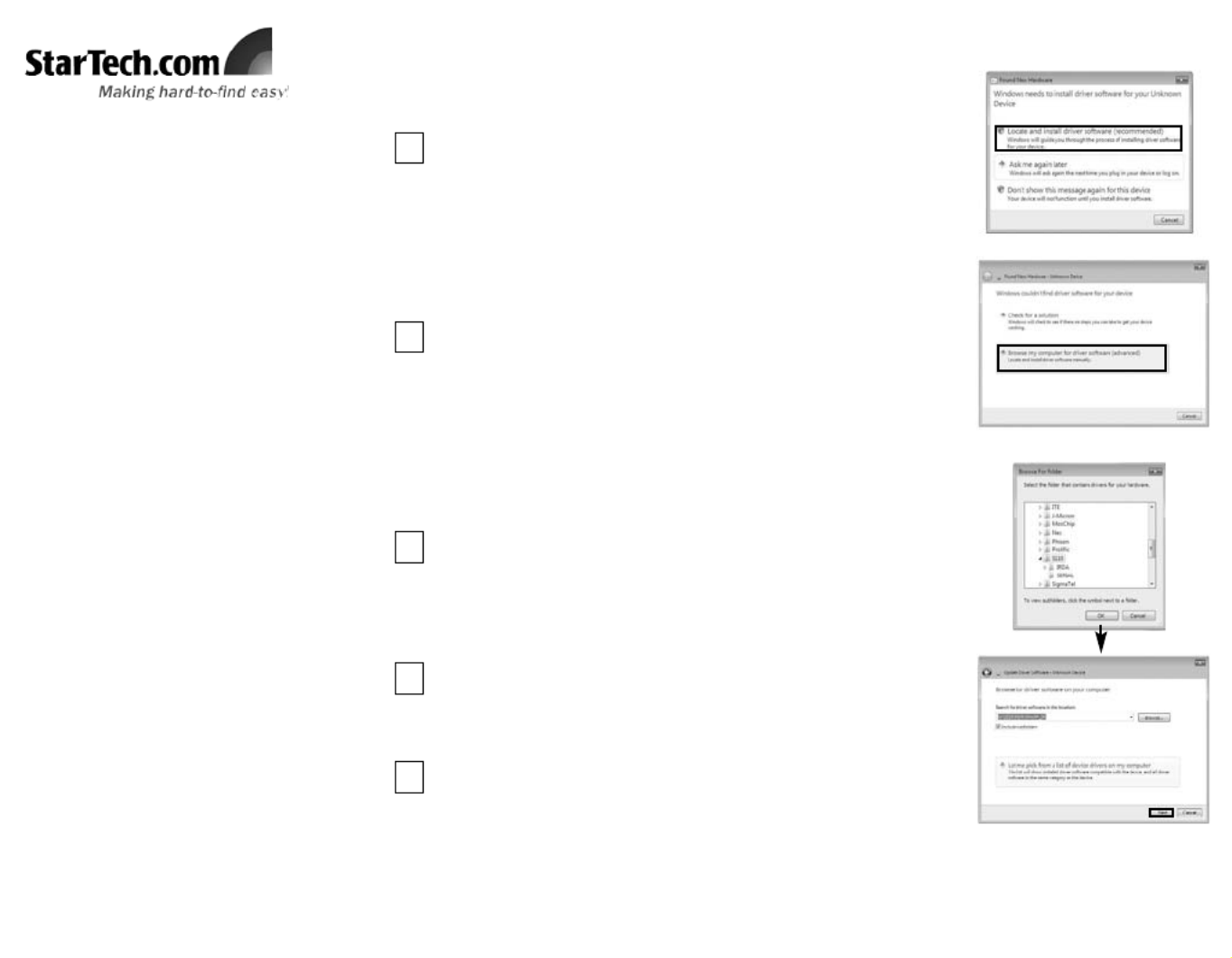
With the computer powered on, connect the USB IrDA adapter to
an available USB port.Windows should automatically detect a
new device, and prompt you for driver installation.Please select
Locate and install Driver Software.
Windows VistaTM
2
Windows will search online for driver updates for the adapter, and
notify you that it couldn’t locate suitable software.Click on
Browse my computer for Driver Software.
3
Windows will search online for driver updates for the adapter, and
notify you that it couldn’t locate suitable software.Click on
Browse my computer for Driver Software.Insert the Driver CD
into the CD/DVD-ROM drive.On the window that follows, click
the Browse button, then navigate to and select the \S110\IRDA\
folder on the driver CD, then click OK to designate the location.
Once the path to the correct file has been specified, click on Next
to begin installation.You will receive a warning, indicating that the
software you are attempting to install has not been verified.Click
on Install this driver software anyways, to proceed through
installation.
4
Once the necessary files have been installed, you will be notified
that The software for this device has been successfully
installed. Click Close.
5
Specyfikacje produktu
| Marka: | StarTech.com |
| Kategoria: | Niesklasyfikowane |
| Model: | USB2IR2 |
Potrzebujesz pomocy?
Jeśli potrzebujesz pomocy z StarTech.com USB2IR2, zadaj pytanie poniżej, a inni użytkownicy Ci odpowiedzą
Instrukcje Niesklasyfikowane StarTech.com

9 Stycznia 2025
9 Stycznia 2025
9 Stycznia 2025
9 Stycznia 2025
9 Stycznia 2025
8 Stycznia 2025
8 Stycznia 2025
8 Stycznia 2025
8 Stycznia 2025
8 Stycznia 2025
Instrukcje Niesklasyfikowane
Najnowsze instrukcje dla Niesklasyfikowane
29 Stycznia 2025
29 Stycznia 2025
29 Stycznia 2025
29 Stycznia 2025
29 Stycznia 2025
29 Stycznia 2025
29 Stycznia 2025
29 Stycznia 2025
29 Stycznia 2025
29 Stycznia 2025