Instrukcja obsługi Supermicro X10SLE-F
Supermicro Niesklasyfikowane X10SLE-F
Przeczytaj poniżej 📖 instrukcję obsługi w języku polskim dla Supermicro X10SLE-F (1 stron) w kategorii Niesklasyfikowane. Ta instrukcja była pomocna dla 27 osób i została oceniona przez 4 użytkowników na średnio 5.0 gwiazdek
Strona 1/1
S
UPERMICR
R
ContaCtnformatIonI
MNL-1486-QRG R. 1.00ev
•www.supermicro.com(Email:support@supermicro.com)
•Manuals:http://www.supermicro.com/support/manuals
•Drivers&Utilities:ftp://ftp.supermicro.com
•Safety:http://www.supermicro.com/about/policies/safety_information.cfm
© 2013 Supermicro Computer Inc. All rights reserved. Reproduction of this document whether in part or in whole is strictly prohibited without Supermicro's written
consent. All Trademarks are property of their respective entities. All information provided is deemed accurate at the time of printing; however, it is not guaranteed.
P C - BaCkageontentsulk
X10sle-f/Hf
Q r g uICkeferenCeuIder. 1.00ev
•One(1)QuickReferenceGuide
LED Indicators
Connectors
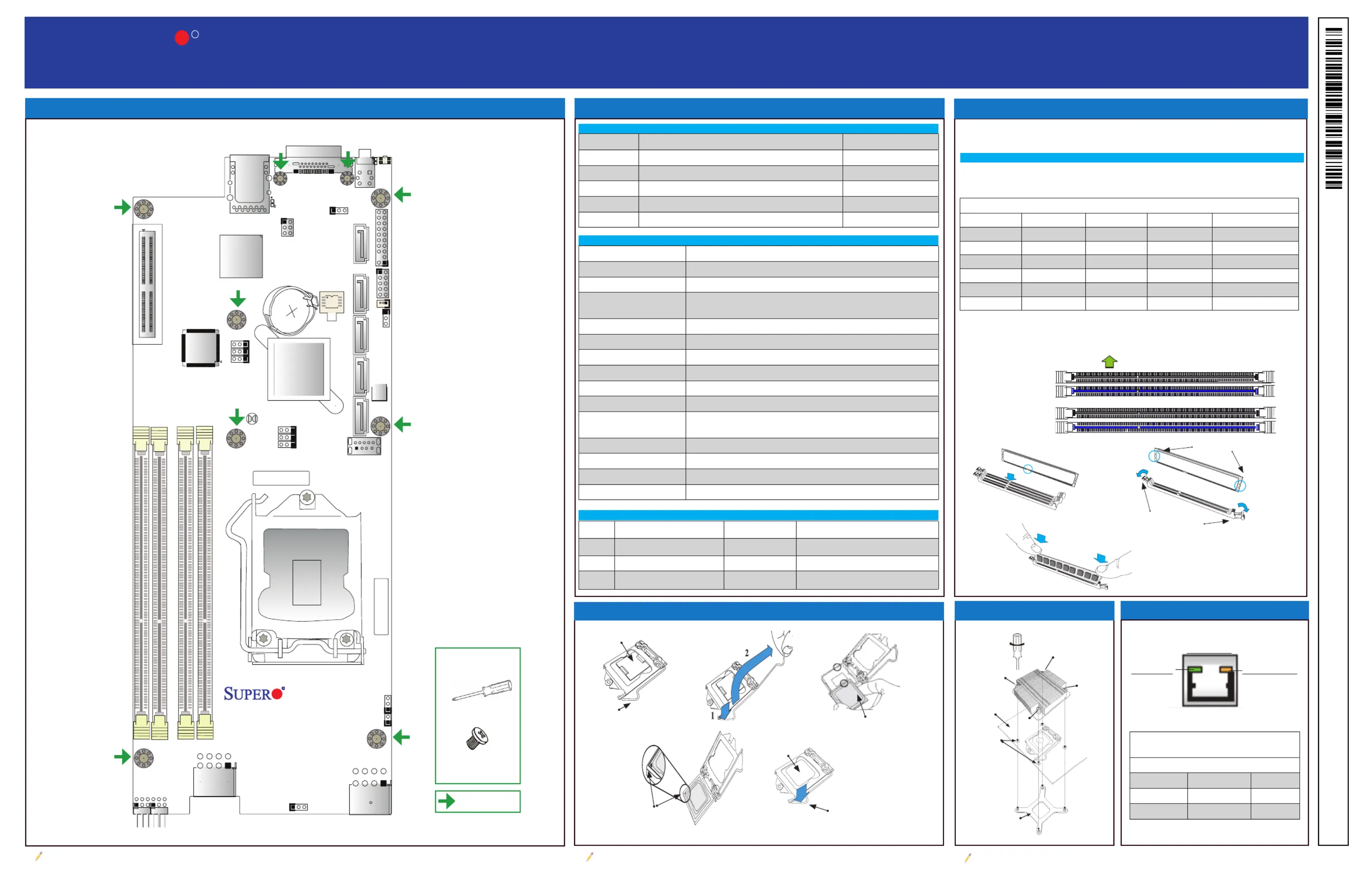
DIMM Memory Installation
Jumpers, Connectors and LED Indicators
Memory Support
Motherboard Layout and Features
Jumpers
Note: Graphics shown in this quick reference guide are for illustration only. Your components may or may not look exactly the same as drawings shown in this guide.
Note: Refer to Chapter 1 of the User Manual for detailed information on jumpers, connectors,
and LED indicators.
Note: Refer to Chapter 2 of the User Manual for detailed information on memory support and CPU/
motherboard installation instructions.
= mounting hole
I-SATA4
JSD1JTPM1
JBR1
JPV1
JWD1
JPB1
JPME2
JPME1
J19
JPG1
J18
J22
JBT1
SW1
LED5
LED6
JKVM1
JUIDB1
JPWR2
I-SATA1I-SATA0I-SATA3I-SATA2
JP16
JP1
JP18
JP17
BAR CODE
MAC CODE
Battery
USB3.0-0
IPMI_LAN
UID
MICRO-LPCI-E 3.0 X8P
X10SLE-F/HF
Rev. 1.00
PWR
DIMMB2
DIMMB1
DIMMA2
DIMMA1
CPU
BIOS
PCH
BMC
AST2400
Intel LP
C226/C224
JumperDescriptionDefault
JBT1CMOS Clear(See Chpt. 2)
JPG1VGA EnablePins 1-2 (Enabled)
JPME1ME RecoveryPins 1-2 (Normal)
JPME2Manufacture Mode SelectPins 1-2 (Normal)
JWD1Watch Dog Timer EnablePins 1-2 (RST)
ConnectorDescription
BatteryOnboard Battery
IPMI_LANIPMI_Dedicated LAN
JKVM1USB (x2)/VGA (Monitor)/COM (UART) Connector for Remote Console
Redirection or Remote Network Interface
JP16Power Output for Hard Disk Drive (12V and 5V)
JP17Motherboard Interface to PDB
JP18Motherboard Interface to PDB
JPWR2SMC-Proprietary Power Connector
JSD1SATA DOM (Device_On_Module) Power Connector
JTPM1Trusted Platform Module/Port 80 Connector
I-SATA0 - I-SATA4(Intel PCH) Serial ATA Ports 0-4 (I-SATA0-3: SATA 3.0 Ports, I-SATA4:
SATA 2.0 Port)
Micro-LP PCI-E SlotSMC-Proprietary Micro Low-Prole (LP) PCI-Express 3.0 x8 Slot
SW1Power Switch/LED Indicator
UIDUnit Identier (UID) Button (JUIDB)
USB2, USB3 (3.0)Internal Type A USB 3.0
The X10SLE-F/-HF supports up to 32GB of Unbuffered (UDIMM) DDR3 ECC
1600/1333/1066 MHz VLP (Very Low Prole) memory in 4 slots.
Memory Population Guidelines
Please follow the table below when populating the X10SLE-F/HF.
Recommended Population (Balanced)
DIMMA2DIMMB2DIMMA1DIMMB1Total System Memory
2GB DIMM2GB DIMM4GB
2GB DIMM2GB DIMM2GB DIMM2GB DIMM8GB
4GB DIMM4GB DIMM8GB
4GB DIMM4GB DIMM4GB DIMM4GB DIMM16GB
8GB DIMM8GB DIMM16GB
8GB DIMM8GB DIMM8GB DIMM8GB DIMM32GB
Insert the desired number of DIMMs into the memory slots, starting with DIMMA2
(Channel A, Slot 2). For the system to work properly, please use the memory
modules of the same type and speed in the same motherboard.
Channel A Slot 1
Channel A Slot 2
(Blue Slot)
Channel B Slot 1
Channel B Slot 2
(Blue Slot)
Towards the CPU
Notches
Release Tabs
Press both notches
straight down into
the memory slot.
Linkivi LEDActty LED
IPMI LAN
IPMI LAN Link LED (Left) &
Activity LED (Right)
Color/State Denition
Link (Left)Green: Solid100 Mbps
Amber: Solid1000 Mbps
Activity (Right)Yellow BlinkingActive
Tools Needed:
Screwdriver
Phillips screws (9)
CPU Installation
CPU Properly
Installed
Load Lever Locked
into Place
Load Lever
Load Plate
Pin 1
North Center Edge
Heatsink Installation
Screw#1
Screw#2
Screw#3
Screw#4
Motherboard
Mounting Holes
Heatsink Bracket
IPMI LAN Port LED
LEDDescriptionColor/StateStatus
LE5BMC Heartbeat LEDGreen: BlinkingBMC Functions Normally
LED5Power Fail/Fan Fail/OverheatRed: OnPower Fail, Fan Fail or Overheating
LED6UID LEDBlue: OnUnit Identied
Specyfikacje produktu
| Marka: | Supermicro |
| Kategoria: | Niesklasyfikowane |
| Model: | X10SLE-F |
Potrzebujesz pomocy?
Jeśli potrzebujesz pomocy z Supermicro X10SLE-F, zadaj pytanie poniżej, a inni użytkownicy Ci odpowiedzą
Instrukcje Niesklasyfikowane Supermicro

8 Stycznia 2025
3 Stycznia 2025
26 Grudnia 2024
26 Grudnia 2024
25 Grudnia 2024
25 Grudnia 2024
25 Grudnia 2024
20 Grudnia 2024
20 Grudnia 2024
20 Grudnia 2024
Instrukcje Niesklasyfikowane
Najnowsze instrukcje dla Niesklasyfikowane
29 Stycznia 2025
29 Stycznia 2025
29 Stycznia 2025
29 Stycznia 2025
29 Stycznia 2025
29 Stycznia 2025
29 Stycznia 2025
29 Stycznia 2025
29 Stycznia 2025
29 Stycznia 2025