Instrukcja obsługi TP-Link Archer TX20E
TP-Link Niesklasyfikowane Archer TX20E
Przeczytaj poniżej 📖 instrukcję obsługi w języku polskim dla TP-Link Archer TX20E (2 stron) w kategorii Niesklasyfikowane. Ta instrukcja była pomocna dla 21 osób i została oceniona przez 8 użytkowników na średnio 4.4 gwiazdek
Strona 1/2
Note:
If the bracket is not suitable for your computer, detach it from
the adapter's board and replace it with the low-prole bracket.
Note:
If the Bluetooth USB cable is not correctly connected to the
motherboard, Bluetooth function won’t work even after driver
installation.
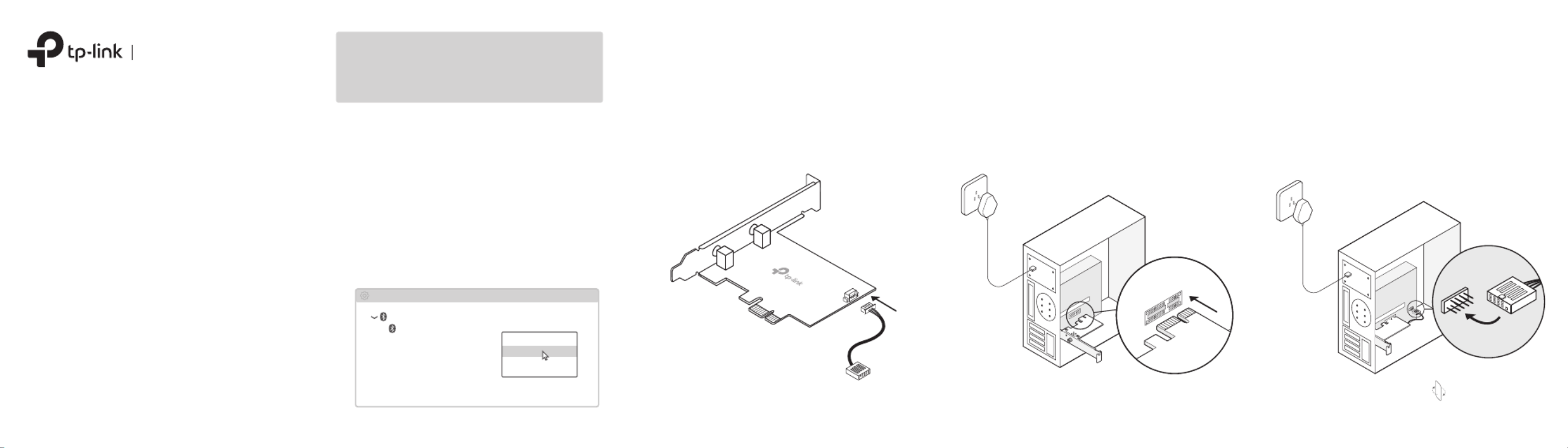
2 Connect to a Computer
a. Turn off your computer, unplug the power
cable then remove the case panel.
c.
Locate an available
PCIE
slot () X1, X4 or X16
and carefully insert the adapter.
d. Locate an available connector and F_USB
carefully plug the Bluetooth USB cable into it.
b. Connect the provided Bluetooth USB cable to
the adapter.
WLAN Bluetooth
PCI Express Adapter
Quick Installation Guide
Images may dier from your actual product.
To continue, ip the page over.
Bluetooth USB cable
Adapter
USB
1 Disable Bluetooth
a. Right-click , select , My ComputerManage
go to Device Manager.
b. Expand the Bluetooth node to nd your
existing Bluetooth device.
c. Right-click the existing Bluetooth device
and select .Disable
Note:
Make sure you have disabled all existing Bluetooth
devices (both built-in and third party).
Bluetooth
Device Manager
Disable
Existing Bluetooth Adapter
Before You Start:
If you plan on using Bluetooth and already
have connected Bluetooth devices, proceed
with step 1. Otherwise, skip to step 2.
Specyfikacje produktu
| Marka: | TP-Link |
| Kategoria: | Niesklasyfikowane |
| Model: | Archer TX20E |
Potrzebujesz pomocy?
Jeśli potrzebujesz pomocy z TP-Link Archer TX20E, zadaj pytanie poniżej, a inni użytkownicy Ci odpowiedzą
Instrukcje Niesklasyfikowane TP-Link

28 Stycznia 2025
28 Stycznia 2025
25 Stycznia 2025
11 Stycznia 2025
8 Stycznia 2025
2 Stycznia 2025
2 Stycznia 2025
2 Stycznia 2025
1 Stycznia 2025
11 Grudnia 2024
Instrukcje Niesklasyfikowane
Najnowsze instrukcje dla Niesklasyfikowane
29 Stycznia 2025
29 Stycznia 2025
29 Stycznia 2025
29 Stycznia 2025
29 Stycznia 2025
29 Stycznia 2025
29 Stycznia 2025
29 Stycznia 2025
29 Stycznia 2025
29 Stycznia 2025