Instrukcja obsługi Videotel Digital VP92 4K
Videotel Digital
Niesklasyfikowane
VP92 4K
Przeczytaj poniżej 📖 instrukcję obsługi w języku polskim dla Videotel Digital VP92 4K (12 stron) w kategorii Niesklasyfikowane. Ta instrukcja była pomocna dla 11 osób i została oceniona przez 6 użytkowników na średnio 4.8 gwiazdek
Strona 1/12
VP92+ Operation Manual
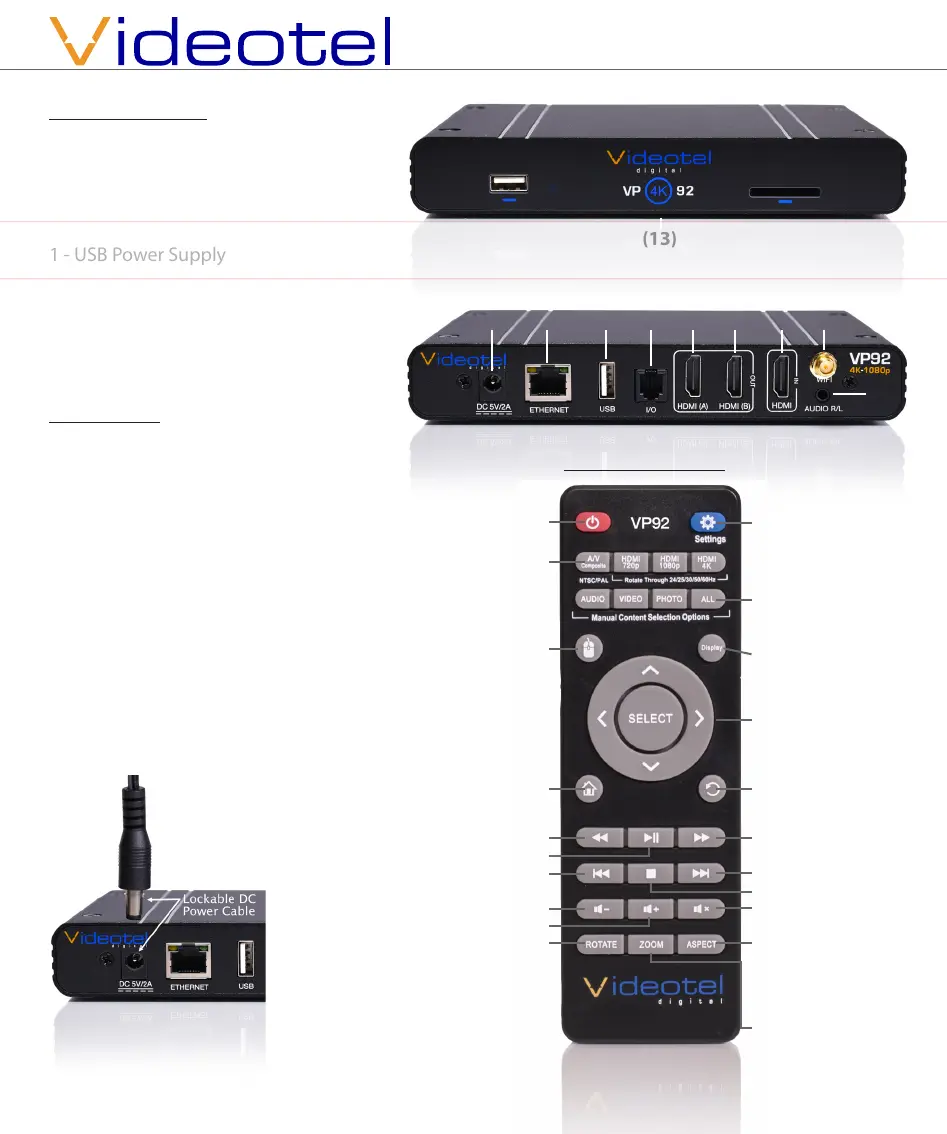
What is in the box
1 - VP92+ Video Player
1 - Remote Control
1 - 5’ HDMI Cable
1 - USB Power Supply
1 - 5’ USB Power Cable
1 - 5’ 3.5mm to RCA A/V Cable
1 - Wi Antenna
4 - Mounting Screws
digital
(7)(5) (6)(4) (8)(3)(2)(1)
(13)
Remote Functions
Power On & O
Change Video
Output - HDMI
only (A/V is N/A)
Mouse Mode -
Press to enter
& exit “mouse
mode”, then
use arrow keys
Home - Returns
to start up
screen
Rewind
Play / Pause
Previous Video
Volume Down
Volume Up
Rotate -Rotates
video counter
clockwise /
clockwise /
normal
OS Settings
- (HDMI, Wi,
Time, Date, Etc)
Playback Set-
tings - SD, USB,
SFTP, LAN, You-
Tube, IPTV, WEB
& HDMI IN
Arrow & SELECT
- Navigate all op-
tions
Last - Returns to
previous screen
Fast Forward
Next Video
Stop Video
Mute Audio
ALL - Lists all con-
tent on SD/USB/
Internal RAM
Zoom - Trim
screen size
(HDMI A Only)
with 6 pre set
options
Videotel Digital
Chula Vista, California
(619) 670-4412
www.videoteldigital.com
Connections
The VP92+ is capable out outputting
HDMI video to either 1 or both ports
(A - up to 4K or B - up to 1080) (5 & 6).
The I/O port (4) is used for RS232/TTL
communication and connecting to our
line of interactive solutions including
PUSH, MOVE, SENSE, WAVE, RFID, SCAN,
TAP and ELEVATE. The USB on the front
or back (3) can be used for a keyboard
and/or mouse. Use the enclosed Wi an-
tenna and attach to the threaded plug
(8) if you plan to use Wi. The audio jack
(9) is used for outputing line level (not
amplied) stereo audio (R & L) . Use the
enclosed power supply
and make sure to line up
the pins on the plug and
then “Twist & Lock” the
plug into the jack (1).
(3)
(9)
Specyfikacje produktu
| Marka: | Videotel Digital |
| Kategoria: | Niesklasyfikowane |
| Model: | VP92 4K |
Potrzebujesz pomocy?
Jeśli potrzebujesz pomocy z Videotel Digital VP92 4K, zadaj pytanie poniżej, a inni użytkownicy Ci odpowiedzą
Instrukcje Niesklasyfikowane Videotel Digital

5 Października 2024

5 Października 2024

5 Października 2024

5 Października 2024

5 Października 2024

5 Października 2024

5 Października 2024
Instrukcje Niesklasyfikowane
- Aplic
- PowerColor
- Emmaljunga
- Thermex
- HK Audio
- Altronix
- JennAir
- Summit
- Silhouette
- Modbap Modular
- Turbosound
- Jordan
- Syrp
- DPM
- Husqvarna
Najnowsze instrukcje dla Niesklasyfikowane

29 Stycznia 2025

29 Stycznia 2025

29 Stycznia 2025

29 Stycznia 2025

29 Stycznia 2025

29 Stycznia 2025

29 Stycznia 2025

29 Stycznia 2025

29 Stycznia 2025

29 Stycznia 2025